Human handoff

AI. Then a human, when it counts.

The objection to every support bot is the same: what happens when it cannot help? Here, a person takes over the same conversation, in the same thread, and the customer never has to start again.

  • A person can take over any conversation, mid-thread
  • Turn the AI off entirely and run it as a pure live-chat inbox
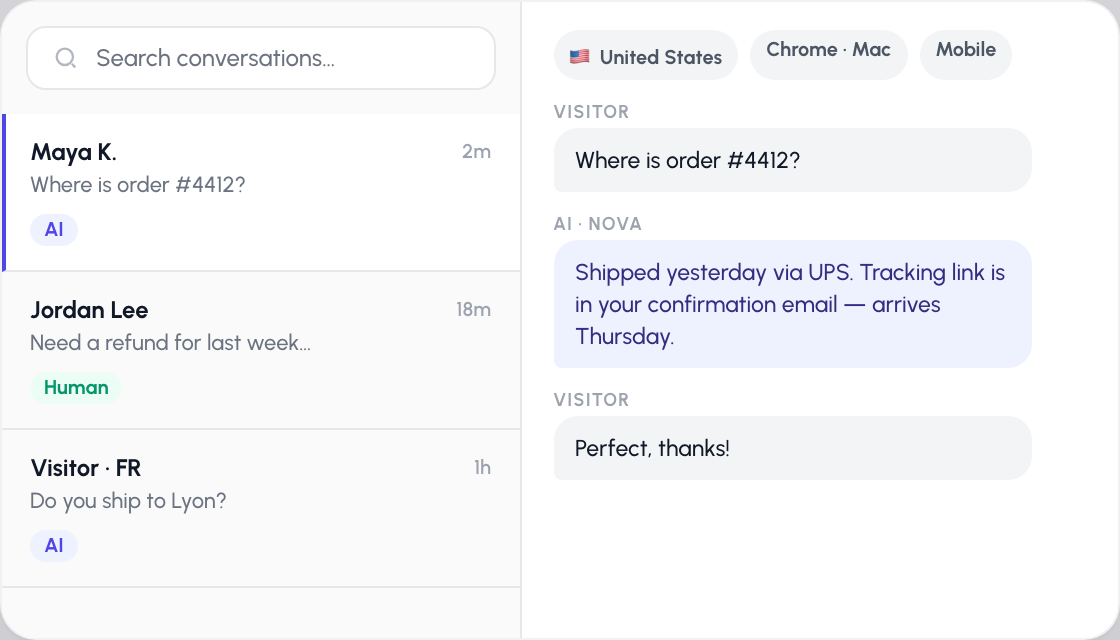
  • Country, browser and device on every conversation
The AssistLoop inbox: a conversation list showing which threads the AI is handling and which a human has taken over, with the visitor’s country, browser and device alongside the thread.

Three ways to staff a conversation

Handoff is not a single switch. You choose how much of the work the AI does, per agent and per conversation, and you can change your mind at any point in a thread.

AI only

The agent answers everything from what it was trained on. Best for high-volume, well-documented questions where a human adds nothing.

AI with escalation

The AI handles the front line and hands over when a visitor asks for a person or hits something it cannot resolve. The thread carries across intact.

Human only

Switch the AI off and use AssistLoop as a straightforward live-chat tool. Same widget, same inbox, no AI in the loop at all.

Take over mid-thread

Any single conversation can be flipped from AI to human without touching the agent’s settings. The customer sees a person start typing, not a handover form.

See who you are talking to

Every conversation carries the visitor’s country, browser and device, so you are not answering blind.

Search every conversation

Full-text search across message history, so you can find the thread where someone reported the bug you are now chasing.

How handoff works

  1. 01

    The AI answers first

    It handles what it can from your training data, around the clock, without waiting for someone to come online.

  2. 02

    A human steps in

    Either the visitor asks for a person, or your team takes the conversation over from the inbox. The full history is already there.

  3. 03

    The thread continues

    Same conversation, same widget, no transfer, no ticket number, no asking the customer to explain it a second time.

Human handoff in depth

The objection every support bot has to answer

Nobody worries that an AI agent will fail to answer the easy questions. They worry about the hard one. The refund that is genuinely complicated, the customer who is already angry, the edge case nobody wrote a help article about. If the only exit from that conversation is a contact form, the bot has made the experience worse, not better.

Handoff removes that risk, which is why it is worth treating as a first-class feature rather than a fallback. The AI is not being asked to be perfect. It is being asked to handle the eighty percent that is repetitive, and to get out of the way cleanly on the rest.

What "seamless" actually means here

Plenty of tools claim seamless escalation and then hand the customer a ticket number. The test is simple: does the person have to repeat themselves? Here they do not. A human takes over the same thread, in the same widget, with the entire conversation already in front of them. From the visitor’s side, the typing indicator just belongs to someone else now.

Your team works from a real-time inbox. Messages stream in over a websocket rather than on a refresh, you can see when a conversation was last seen, edit a message you sent too quickly, and mark a thread open or closed. Conversations arrive with the visitor’s country, browser and device attached, which is often enough to spot the problem before you have read the first message.

A person takes over the same thread, in the same widget, with the entire conversation already in front of them. The customer never repeats themselves.

Or skip the AI entirely

Human-only mode turns the AI off and leaves you with the widget and the inbox. This is genuinely useful in two situations. Some teams start here, run it as plain live chat while they build up their training data, and switch the AI on once they trust what it knows. Others keep one agent human-only for a sensitive queue, like billing disputes, while a second agent handles general questions automatically.

Because the mode is set per agent, both can run on the same site at the same time.

The mode is set per agent, so a human-only billing queue and an automated general queue can run on the same site at the same time.

What it costs

Human handoff is available from the Basic plan upward, and the number of team members who can staff the inbox rises with your tier. Additional seats are available as an add-on if you need more than your plan includes. See pricing for the current numbers.

One detail worth knowing: file attachments in a conversation are supported when a human is handling it, up to four files of 5MB each. That matters more than it sounds, because "send me a screenshot" is how a large share of real support conversations get resolved.

Handoff starts on the Basic plan, and seats rise with your tier. In a human-handled conversation, visitors can attach up to four files of 5MB each.

Frequently asked questions

Can a human take over a conversation the AI has already started?

Yes. Any conversation can be switched from AI to human at any point, and the person taking over sees the entire thread. The customer stays in the same conversation and does not need to repeat anything.

Can I turn the AI off completely?

Yes. Human-only mode disables the AI and leaves you with the chat widget and a live inbox, so AssistLoop works as a straightforward live-chat tool. The setting is per agent, so you can run one human-only agent and one AI agent on the same site.

What happens to a conversation when nobody is online?

The AI keeps answering. That is the point of running both: the agent covers the hours your team does not, and a person picks up the conversations that were escalated when they are next at their desk.

What can my team see about the visitor?

Each conversation carries the visitor’s country, browser and device, alongside the full message history. If you also pass a signed identity token from your own app, the agent can additionally know exactly which of your logged-in customers it is speaking to.

Is human handoff available on the free plan?

No. Handoff starts on the Basic plan. The number of team members who can staff the inbox depends on your tier, and extra seats can be added on.

Can customers send files to a human agent?

Yes, when a human is handling the conversation. Up to four files of 5MB each, which covers the screenshot-driven back and forth that most real support threads turn into.

Keep exploring

Let the AI take the volume, not the blame

Set up an agent that answers what it can and hands you the rest, without the customer ever starting over.