How to Add AI Customer Support to a React App
A tested install for React apps: the useEffect hook that loads the AssistLoop chat once from your main component, the Next.js version, and the fixes for a missing or doubled chat button.
 AssistLoop Team12 min read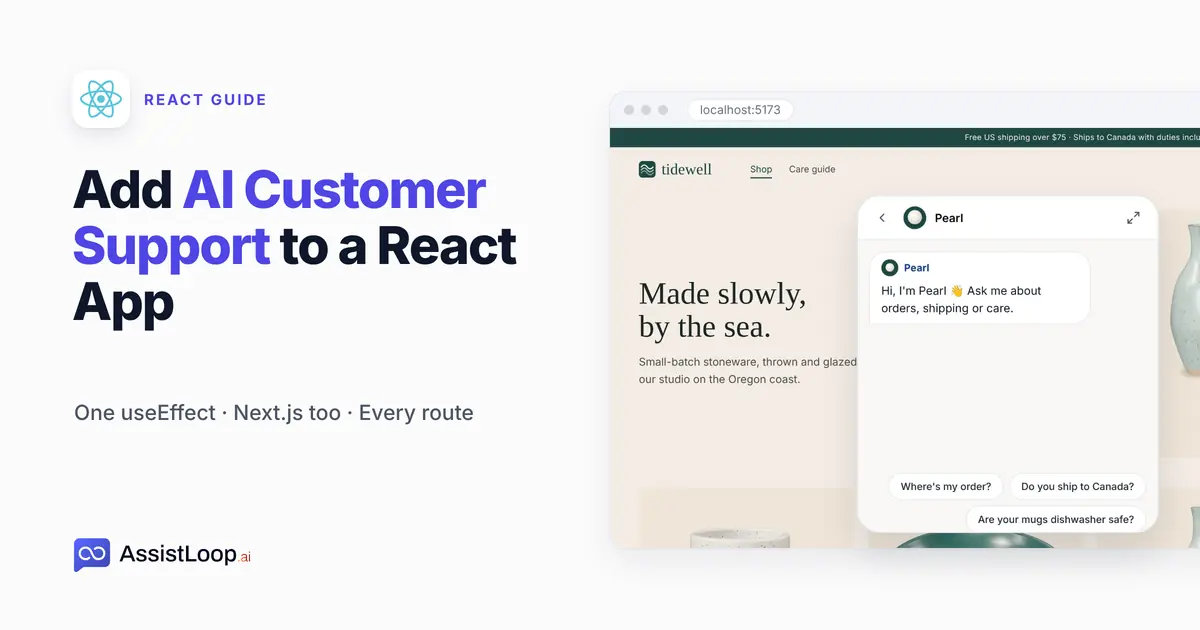
On this page
In a React app the chat belongs in your code, not pasted into a page, and the obvious first attempt loads it twice in development. This guide adds AssistLoop to a React app with one useEffect in your main component. An AI support agent that learned your own site then answers on every page, and keeps the conversation as visitors move around. It also covers Next.js and the two mistakes that leave you with no chat button or two of them; budget fifteen minutes, mostly for testing.
Last updated: October 2026. We built this guide in a small React 19 app on Vite, recorded in mid-October 2026. On 23 October 2026 we ran the hook again in a fresh copy of the app, and the Script version in a Next.js 15.5 app. Both times we counted script tags and chat buttons before and after changing pages.
Quick answer
|
A customer on a pottery shop's care guide wants to know whether the Kelp Bowl can go in the oven. The answer sits a few lines down that very page, yet they'd rather ask than scroll, so the question reaches your inbox the next morning.
That shop is Tidewell Ceramics, our fictional pottery brand, rebuilt for this guide as a small React app whose two pages, Shop and Care guide, swap without a page reload. Its agent, Pearl, had already read Tidewell's website in AssistLoop. Every screen below comes from that app.
The minute-and-a-half video shows the whole install in that app, from the dashboard to the second page.
What you need
A trained AssistLoop agent. No account yet? Sign up, click Create Agent, name it, type your address under Website/Links and click Fetch Links. The final Create Agent click starts training on your website.
Your React project open in an editor, with its dev server running so you can test before you deploy.
The file that wraps every page: App.jsx in a Vite or Create React App project, the root layout in Next.js.
Where the code goes in your app
A React app renders every page from one main component, so that component is the place for the chat: it loads once and nothing unmounts it when the visitor changes page. React's own guide to effects names this kind of job. It says: "Effects let you run some code after rendering so that you can synchronize your component with some system outside of React." Its list of outside systems includes third-party widgets (Synchronizing with Effects, react.dev).
| Your app | Put it in | Load with |
|---|---|---|
| Vite or CRA | App.jsx | useEffect |
| Next.js | Root layout | Script |
| Plain HTML | Each page | Script tag |
In Stack Overflow's 2025 Developer Survey, 44.7% of the 23,678 people who answered the web-framework question had done extensive development work in React over the past year.
Not on React? A hand-coded site takes the HTML code before the closing body tag, and WordPress has an official plugin. For Vue, the dashboard says to use the mounted lifecycle hook instead of useEffect; we didn't build a Vue app for this guide.
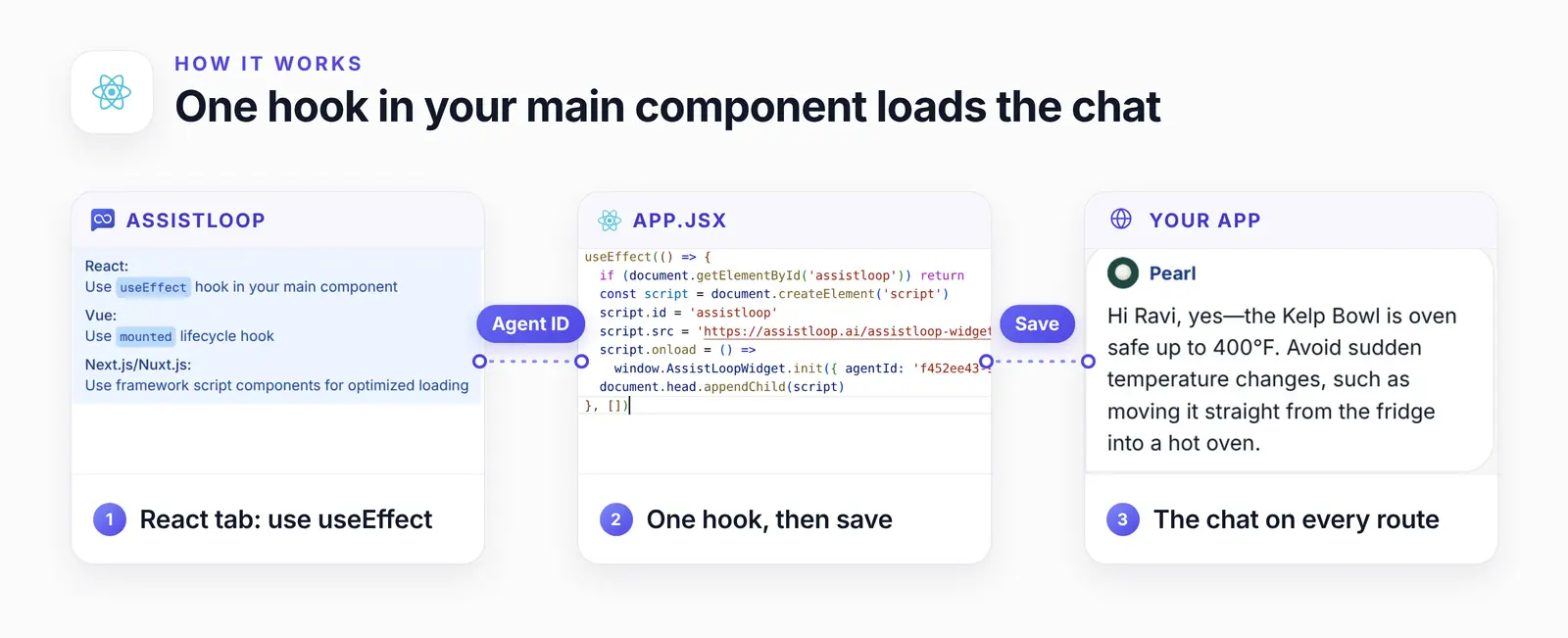
The React tab's advice, the hook that follows it, and the chat it puts on the page.
Why the hook checks for the script first
Under StrictMode, React runs a component's effects twice in development, on purpose: React's docs explain that it mounts each component twice to stress-test its effects, and only in development. Vite and Create React App projects wrap the app in StrictMode from the start.
We removed the check to see what happens. With the dev server running, the page got two copies of the AssistLoop script tag and two chat widgets. With the check back in, it had one of each. The fix is the first line of the hook: give the script tag an id, and return early when an element with that id is already on the page.
Step 1: Pick React / Vue / SPA in Widget Installation
Open your agent in AssistLoop, choose Widget Installation in the sidebar and pick React / Vue / SPA. The tab has three steps: extract the script logic, integrate it with your framework, then deploy and verify. For React, it says to use a useEffect hook in your main component.
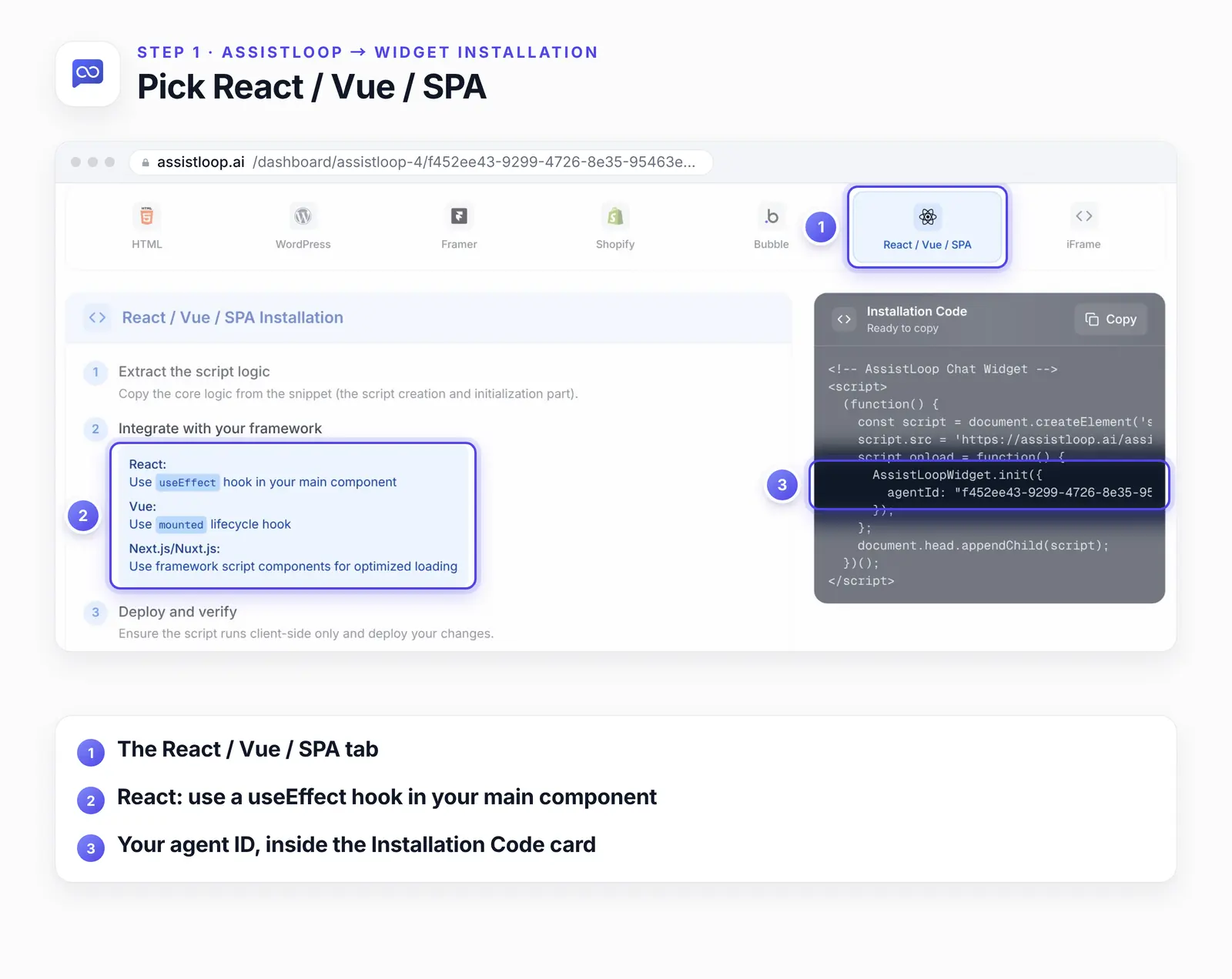
The Installation Code card shows the same snippet as the HTML tab. You only need two things from it: the script address and your agent ID.
The agent ID is the long value after agentId in the code card. Settings → General shows it too, as Agent ID with a copy icon beside it.
Step 2: Add one useEffect to App.jsx
Open src/App.jsx, add useEffect to the React import, then put the hook at the top of your App component, above the return:
import { useEffect } from 'react' // or add useEffect to your existing React import |
Replace YOUR_AGENT_ID with the ID from Step 1. The empty array at the end tells React to run the hook once, when the component first appears, and the id check covers the extra development run.
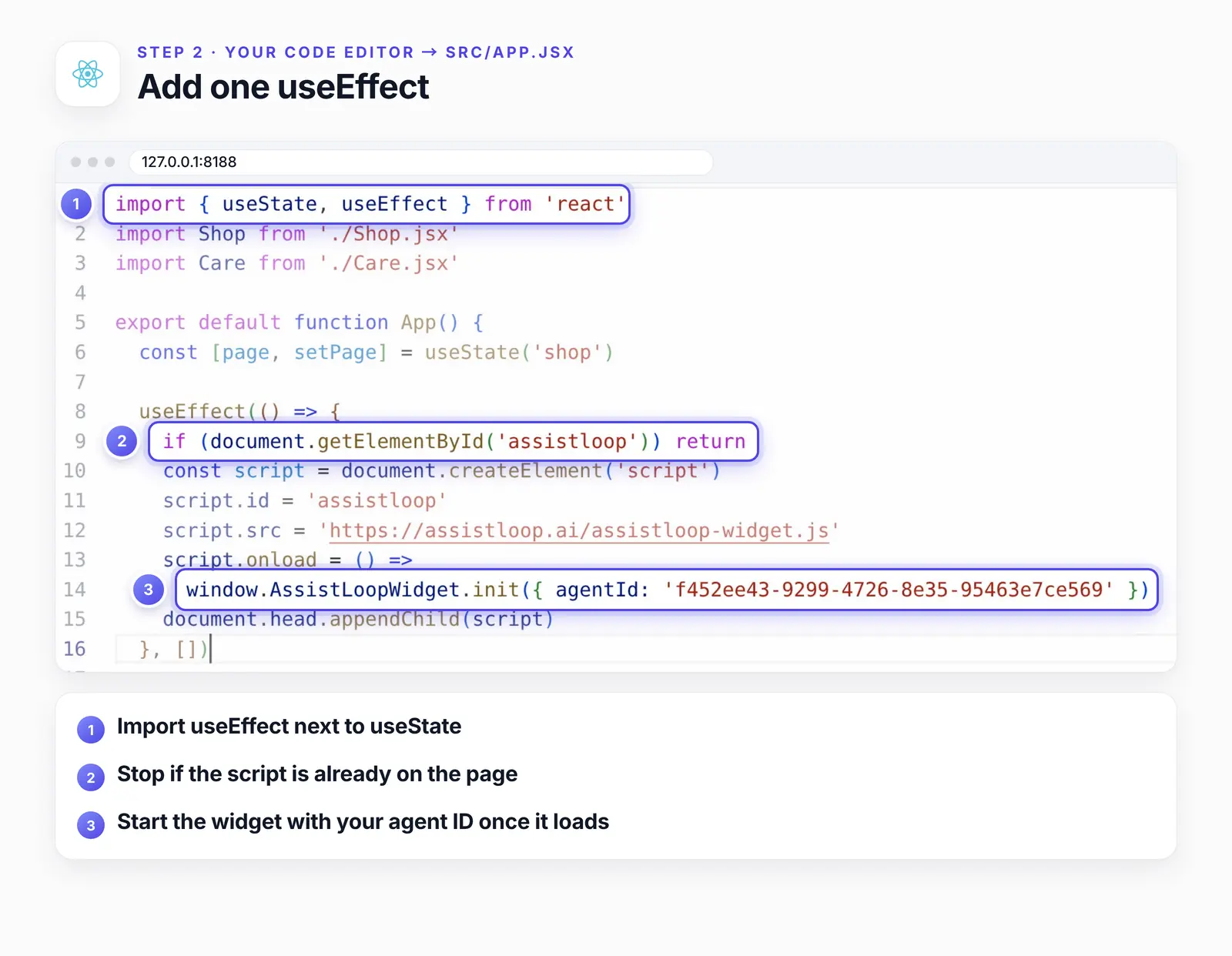
Lines 8 to 16 are the whole install. Everything below the hook is the app as it was.
Writing TypeScript? TypeScript doesn't know about window.AssistLoopWidget, so your editor and tsc report "Property 'AssistLoopWidget' does not exist on type 'Window & typeof globalThis'". Declare it once, at the top of the file, or in a .d.ts file that ends with export {}:
declare global { |
Step 3: Save, then ask a question in your app
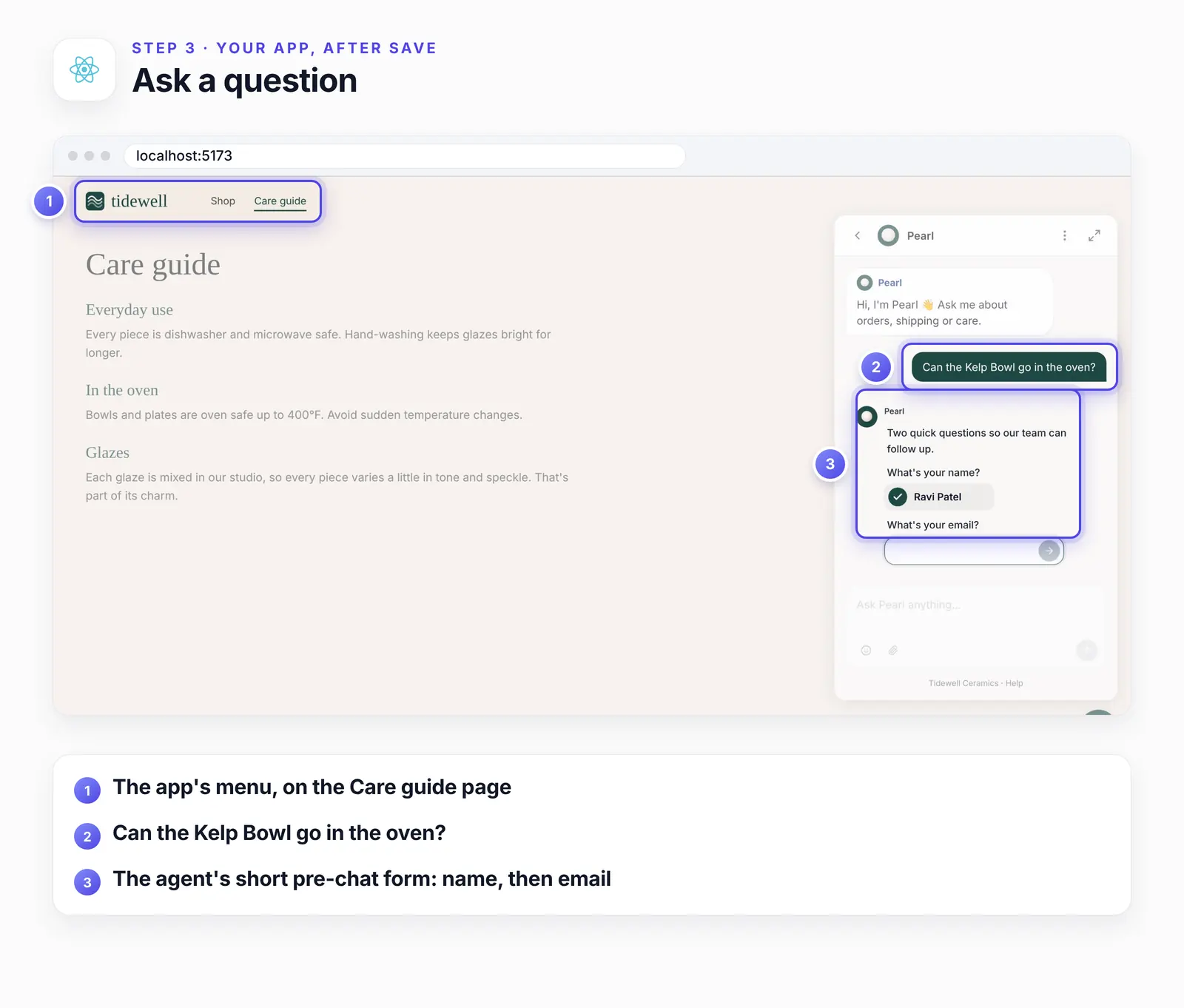
Save the file. The dev server reloads the app, and the chat button appears in the bottom-right corner. Open it and ask something your site answers.
On the Care guide page we asked "Can the Kelp Bowl go in the oven?" Pearl first asked for a name and an email, because its pre-chat form is switched on (a third question, the order number, is optional, and we skipped it). Then it answered:
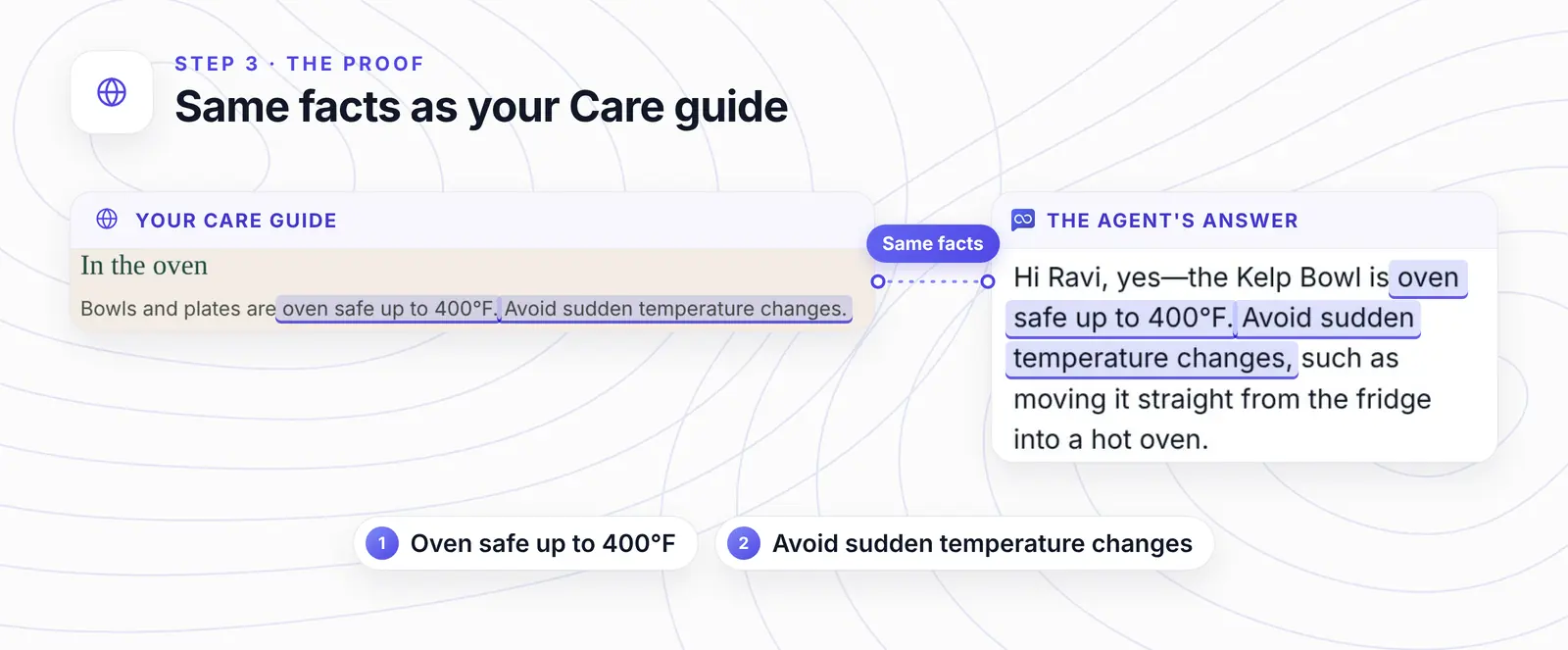
Hi Ravi, yes—the Kelp Bowl is oven safe up to 400°F. Avoid sudden temperature changes, such as moving it straight from the fridge into a hot oven.
The Care guide's own oven line says the same thing in fewer words, and both facts in the reply come from it.
Want your React app answering questions like this? |
Step 4: Change pages and check the chat stays
Click to another page of your app. Because the hook lives in the component that wraps every page, nothing removes the widget, and the open conversation carries over. In our app, Ravi's form answers and Pearl's reply were still in the chat on the Shop page.
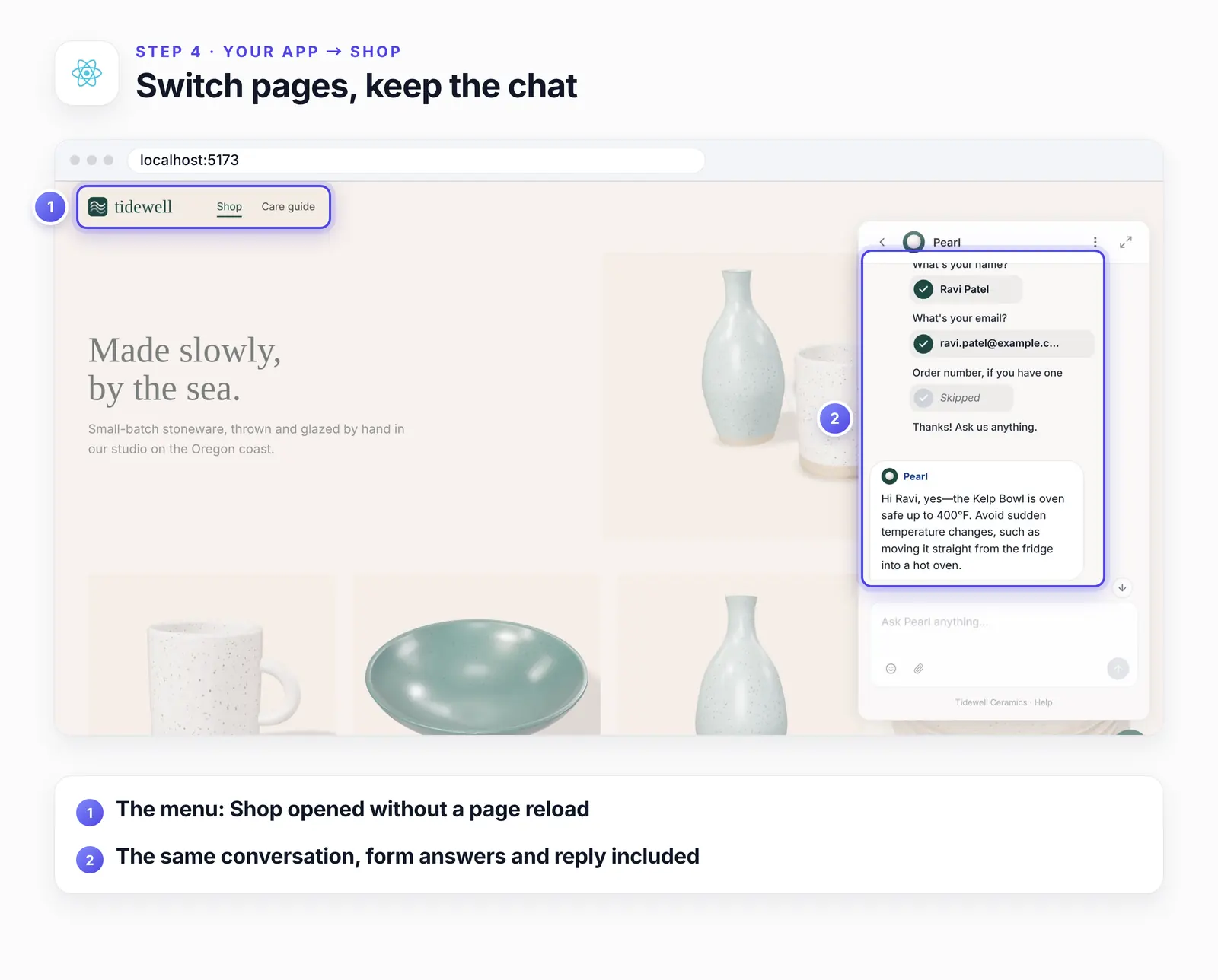
Our test app swaps pages without a reload. We checked a router too: in the Next.js app, the same chat widget was still on the page after a link click.
When it works on the dev server, deploy the app the way you usually do and open the live site once in a private window.
Adding the chat in Next.js
The React tab's line for Next.js is to use the framework's script component. Next.js documents a strategy for exactly this kind of script: lazyOnload loads it when the browser is idle, and the examples listed for it include "Chat support plugins" (Script Component, Next.js docs, updated August 2026).
Put the script in a small client component, because onLoad works only in Client Components:
// app/AssistLoop.js |
Then render it once in the root layout, inside the body and after children:
// app/layout.js |
In our Next.js 15.5 test app, the script loaded once, and after a link click from the home page to a second page the same chat widget was still there.
If the chat doesn't appear, or appears twice
Start in the browser's developer tools (F12): the Console shows script errors, and the Elements panel shows how many AssistLoop script tags the page has.
Two chat buttons. The hook ran twice without the id check, the component is mounted in more than one place, or the HTML snippet is also in index.html. Keep the id line and one install only.
No chat button and no error. The hook is in a component that isn't on screen yet, such as one page. Move it to App.jsx or the root layout.
"Cannot read properties of undefined (reading 'init')" (Chrome's wording). Something called init before the script finished loading. Call it from onload (or onLoad in Next.js), as in the code above.
"document is not defined" during a server render. The code runs outside the hook. Touch document only inside useEffect, or use the Script component above; 'use client' alone doesn't stop the server render.
The code still says YOUR_AGENT_ID. Paste your own ID from Widget Installation or Settings → General.
An ad blocker or a Content Security Policy blocks it. Try a private window with extensions off. If your app sends a Content Security Policy, the Console names the directive that blocked assistloop.ai. Add assistloop.ai there: script-src for the script, frame-src for the chat window.
How we tested this
The app: Tidewell's shop rebuilt as a React app on Vite, with Shop and Care guide pages that the menu swaps without a reload, wrapped in StrictMode. The recording used VS Code for the web (code-server) at 127.0.0.1:8188 and the Vite dev server at localhost:5173, the addresses in the step figures.
The agent: Pearl, trained on Tidewell's published website, with its pre-chat form switched on. The answer in Step 3 is quoted word for word.
The recheck, 23 October 2026: a fresh copy of the app on React 19.3 and Vite 6.4, run with and without the id check, counting script tags and widget frames after load and after a page change. Then a new Next.js 15.5 App Router app with the client component above and two routes linked with next/link.
TypeScript: the hook compiled in strict mode with the declaration above, and failed with the quoted error without it.
Not tested: Vue, Remix, Gatsby, React Router and production builds on a host. The dashboard's Vue step is quoted, not tried.
The screenshots: frames from the October recording, cropped, with pins and outlines drawn around the interface, never on it.
Frequently asked questions
Where should the code go in a React app?
In the component that wraps every page, usually App.jsx, or the root layout in Next.js. A hook inside a single page would only load the chat when that page opens.
Will StrictMode load the chat twice?
Only without the id check. StrictMode runs effects twice in development, and in our test that put two widgets on the page. The check stops the second run, and production builds run the effect once anyway.
Is there an npm package for the AssistLoop widget?
Widget Installation offers a script, not a package. The hook in Step 2 loads that script, so there's nothing to install and no version to keep updated.
Can I paste the HTML code into index.html instead?
In a Vite or Create React App project, yes: index.html is a plain page shell, and the HTML guide shows where the code goes. The hook keeps the install in your React code, where you can load the chat only after cookie consent or only for signed-in users. Next.js has no index.html, so use the Script component there.
Will the chat slow down my app's first load?
It doesn't hold up your first render. An effect runs after React has rendered, and the script loads in the background from there. In Next.js, lazyOnload waits for browser idle time. We didn't time page loads for this guide.
Back in that React shop, the oven question gets its answer on the Care guide itself, and the conversation follows the customer to the Shop page. Put an agent that knows your site into your React app, and when it gets an answer wrong, here's how to teach it the right one with a Q&A pair.
 | Written by AssistLoop Team We build AssistLoop, an AI support agent that answers customers from your own website and documents, and hands the chat to your team when a person should step in. ★★★★★ "I also love that it's flexible enough to be used with different websites, and it's brandable, allowing for customization." Ryan N., Managing Owner, Working Nomads, on G2 |
Build Custom AI Chatbot for Your Business FREE
Create intelligent AI agents that handle customer support, boost conversions, and work 24/7 for your business.
Build Your Agent