How to Fix a Wrong Answer From Your AI Support Agent
If your AI support agent keeps giving wrong answers, the replies themselves usually point to the cause. This guide's table matches each kind of bad reply to its cause and its fix. Then we film the fix for the first row: a missing fact, added as a Q&A pair in AssistLoop. It takes about five minutes, and we check it in the same chat that went wrong.
 AssistLoop Team13 min read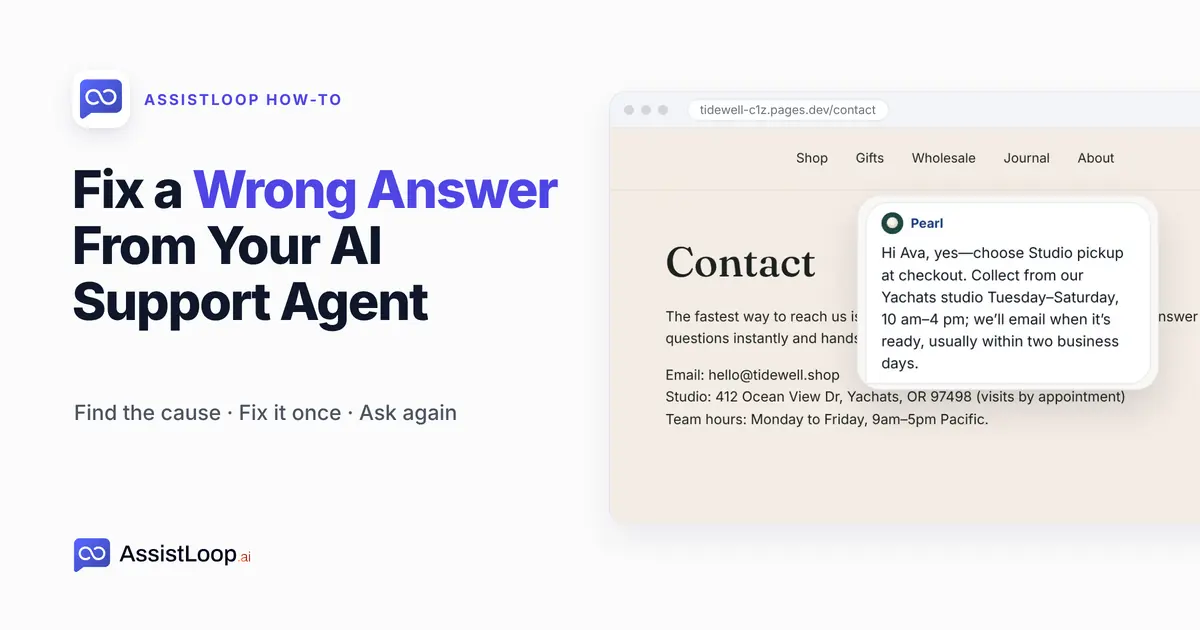
On this page
Updated October 2026. We filmed the fix on 18 October 2026, from a shopper's first question to the corrected reply, on a demo shop's site.
Quick answer
If the reply is confidently wrong, it often comes from an outdated or conflicting source. Retrain or delete it in Data Sources (rows 2 and 3 of the table). For an order lookup or a chat that needed a person, the table below gives the fix. |
Ava is about to order from a pottery studio on the Oregon coast. Before she pays for shipping, she opens the Contact page and asks the chat: "Can I pick up my order at your studio?"
The agent replies: "Hi Ava, I don't have pickup details for studio orders. You can contact us at [email protected] to check availability."
The reply is polite and no help to her. The Contact page gives the studio's address and "visits by appointment", and nothing about collecting an order.
So the agent had nothing to answer from, and it said so instead of guessing. A Deakin University team studied where document-answering AI systems break down (Barnett and colleagues, January 2024). They call this the "happy case" of missing content: the system admits it doesn't know.
Their warning is the other half. A question that sits close to your content can coax the same system into answering anyway. That makes Ava's miss the easy kind to fix.
Pearl, the agent in this guide, works for Tidewell Ceramics, a stoneware studio we invented for these walkthroughs. Shoppers reach her on the studio's demo site, tidewell-c1z.pages.dev.
The fix is also on video, under two minutes from Ava's empty reply to the corrected one.
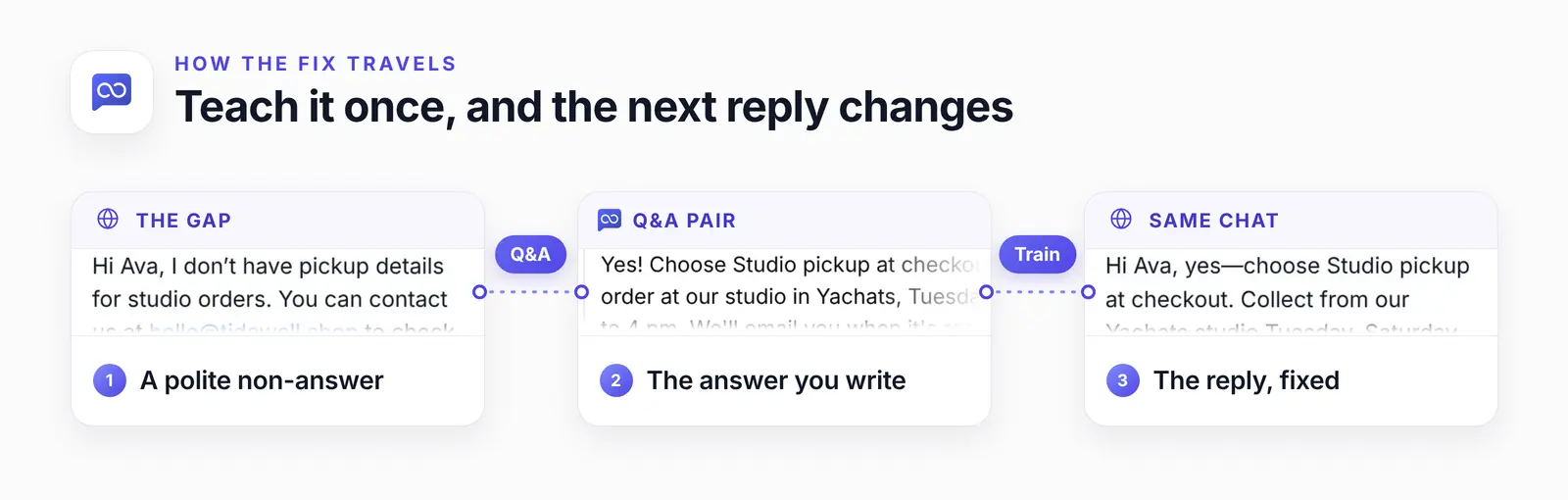
What changes is the agent's knowledge. Ava's first reply stays as it was, and the next one uses the pair.
Why your AI support agent gives wrong answers (and the fix for each)
An AI support agent usually gives wrong answers because of what it was given: a missing fact, a page that changed after training, two sources that disagree, or a question that needs the customer's own data. An AssistLoop agent answers from the pages, files and notes you train it on, not from the open internet. Check those before you swap the AI model. Read the bad reply, find its row, and apply that fix.
| Cause | Sign | Fix |
|---|---|---|
| Missing fact | Says "I don't have…" | Add a Q&A pair |
| Old page | Old price or date | Retrain the source |
| Two sources | Varies by chat | Delete the old one |
| Fact split up | Half an answer | One pair or snippet |
| Long policy | Misses edge cases | Snippet or file |
| New wording | One phrase fails | Add their words |
| Order data | Policy reply to an order | API action |
| Made up | A detail you never wrote | Fact + rule |
| Needs a person | Refund or anger | Handoff |
A split fact often shows up as the rule for the wrong case: a shopper asks about shipping to Canada and gets your domestic shipping times. Put the whole answer in one Q&A pair or text snippet so the agent finds it in one place.
Rows 2 and 3 start in Data Sources. AssistLoop's replies don't name their source. So open the website, file and snippet rows that cover the topic, and look for the old fact. Then use that row's ⋯ menu: Retrain once you've edited the page on your site, View and edit for a snippet or Q&A pair, or Delete for a source that is simply out of date.
AssistLoop doesn't re-read a page on its own, so the retrain is yours to click. For an invented detail, put the fact itself in Data Sources. The instructions line only tells the agent to say so when its sources don't cover a question.
AssistLoop's advice on Q&A pairs is deliberately narrow: "Use Q&A sparingly and deliberately, for the small set of answers where being approximately right is the same as being wrong". Studio pickup days and hours are exactly that kind of answer.
A polite gap or a confident wrong answer
An agent that says it doesn't know is the safe failure: a non-answer stands out when you scan the inbox, as Ava's did. A confident wrong answer reads like every other reply, so nobody flags it until a customer acts on it.
That tone comes with the technology. Writing for Nielsen Norman Group on 16 May 2025, Pavel Samsonov says: "Outputs of genAI tools mimic certain attributes that we associate with authoritative sources. Their tone is unerringly confident, regardless of the accuracy of the response".
Having the source text in hand doesn't make a model immune either. Vectara's hallucination leaderboard, updated 16 October 2026, measures how often language models add unsupported content when they summarise a document. Across the 109 models it lists, that rate runs from 1.8% to 24.2%. So read what your agent says, even after a fix.
The answer is also yours to own. In Moffatt v. Air Canada, the airline's website chat suggested a customer could apply for bereavement fares retroactively, which Air Canada didn't permit. A Canadian tribunal ordered the airline to pay $812.02, and wrote:
I find Air Canada did not take reasonable care to ensure its chatbot was accurate. While Air Canada argues Mr. Moffatt could find the correct information on another part of its website, it does not explain why the webpage titled “Bereavement travel” was inherently more trustworthy than its chatbot.
That's the Civil Resolution Tribunal of British Columbia in 2024 BCCRT 149, issued 14 February 2024. Its second sentence describes row 3 of the table: two parts of one website telling customers different things.
To catch a confident miss before a customer does:
Once a week, read that week's replies about money, dates and policies against your own pages.
List the replies where the agent said it didn't have something, and turn the frequent ones into Q&A pairs.
After you change a page, ask the agent about it yourself, and retrain if the reply is out of date.
Fix a missing answer with a Q&A pair, step by step
When an AI support agent is missing a fact, add the fact as a Q&A pair in Data Sources and train it. Here's that fix, row 1 of the table, filmed in Pearl's dashboard. Have the customer's exact question and the facts your answer should carry.
Step 1: Find the chat that went wrong
In AssistLoop, open Conversations for your agent and open the chat. Read the customer's question and the agent's reply side by side.
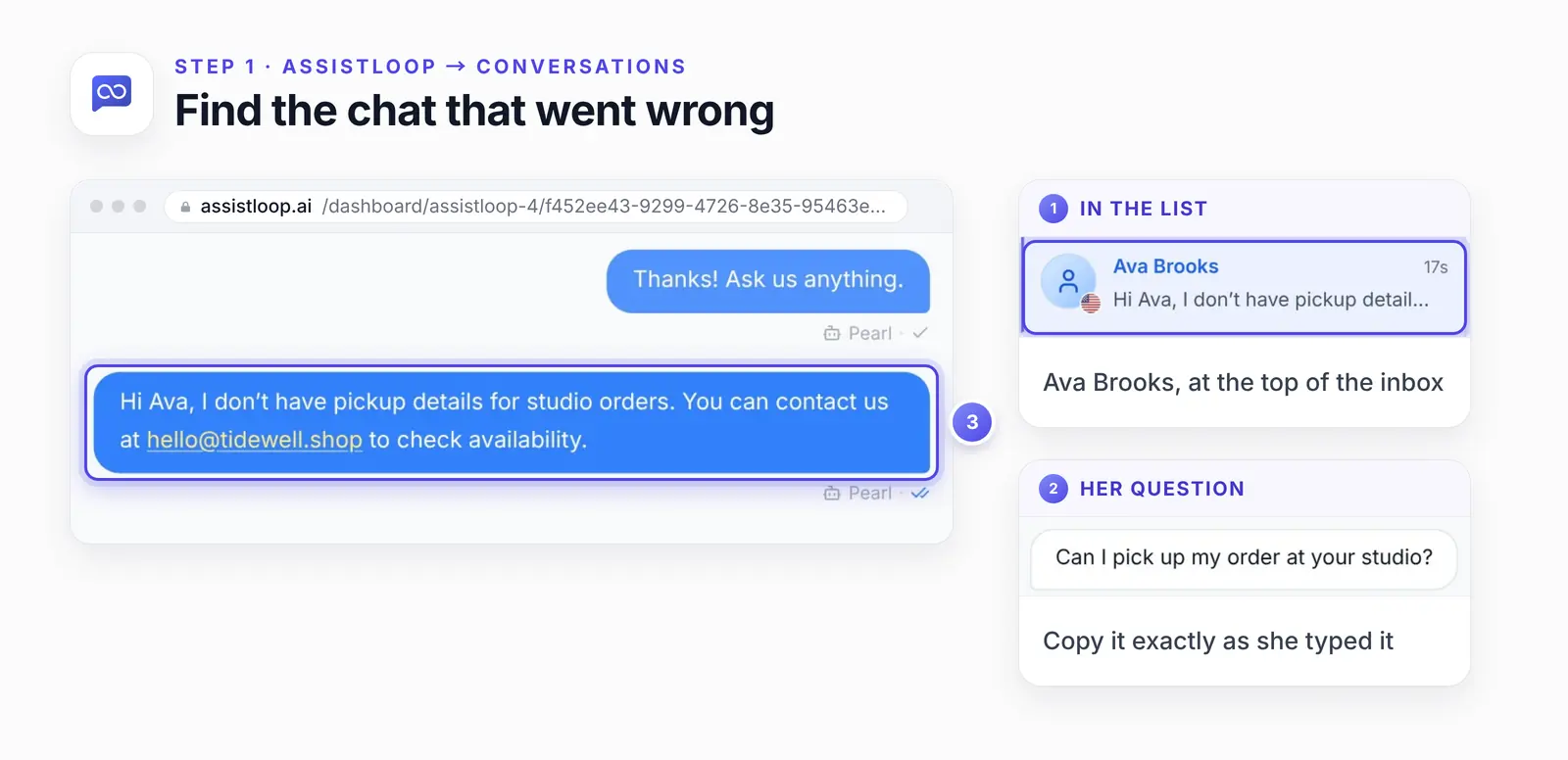
Keep the customer's question exactly as typed. Their wording makes the best Q&A question.
Then name what was missing. Here it was three facts: that pickup exists, where it happens and when.
Step 2: Open Q&A pairs and click Add Q&A
In the agent's sidebar, click Data Sources. Pick the Q&A pairs tab, then Add Q&A.
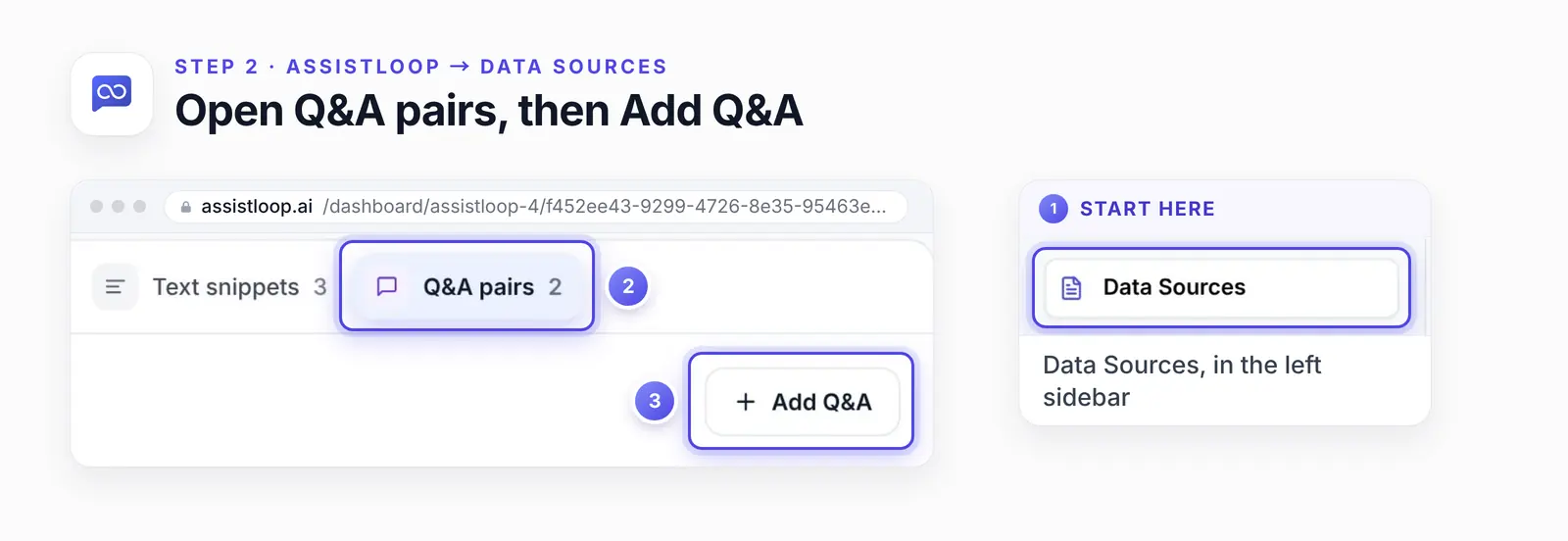
Q&A pairs sit beside websites, files and text snippets, the other places the agent learns from.
Step 3: Type the question, then another way to ask it
In the Question & Answer Pairs form, type the question the way the customer asked it. We used Ava's: "Can I pick up my order at your studio?"
Click Add More Questions and enter a second wording, such as "Do you offer local pickup?". One pair can hold several phrasings, and they all lead to the same answer.
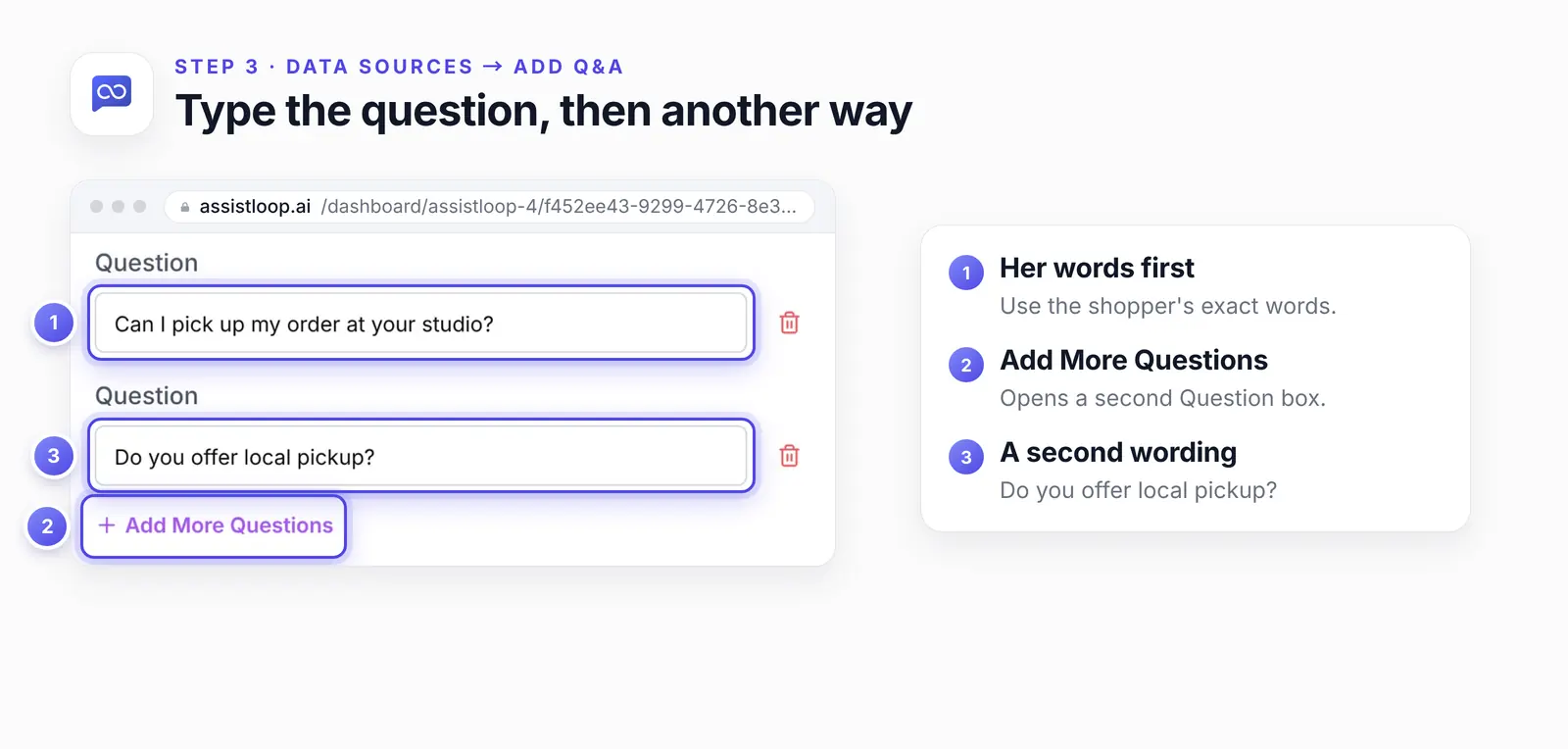
Two or three phrasings cover most customers. Use their words, not your product names.
Step 4: Write the answer, then Save and Train
Under Answer, write the reply you want customers to get. Include everything they need to act on it. Here's the whole pair as we entered it, ready to adapt:
Question 1: Can I pick up my order at your studio? |
Click Save and Train. A few seconds later, the pair's row in the list showed Trained and Used in answers.
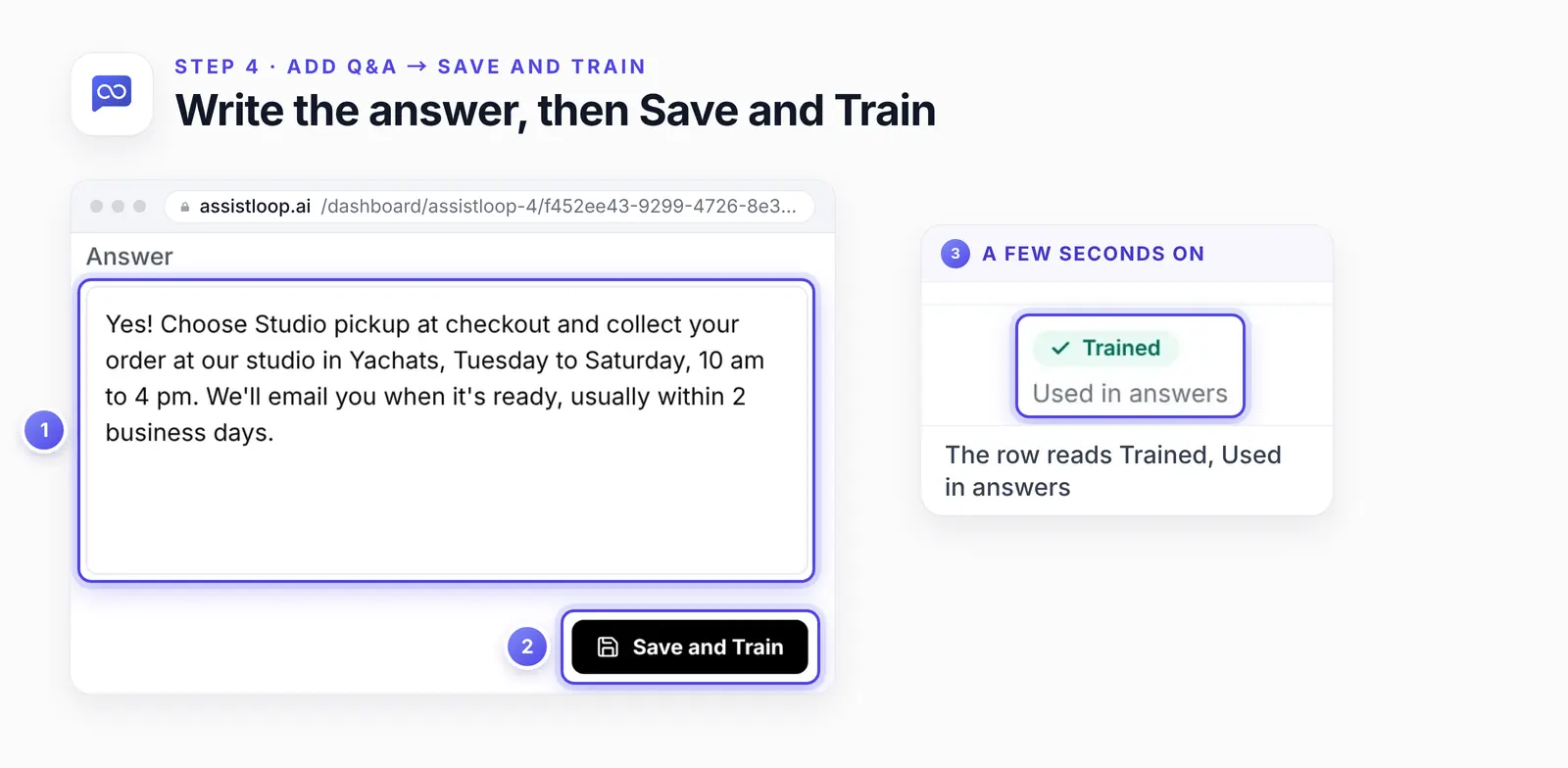
Write it the way you'd reply yourself. The agent adapts the wording and keeps the facts.
Step 5: Ask the customer's question yourself
Open a new chat on your site, or your agent's Playground. Type the customer's question as they wrote it. Then ask it one or two other ways, and read each reply against your pair.
Ava's own open chat picked it up too: her next message got the new answer. Back on the Contact page, with the empty reply still in view, she typed "So can I pick it up at your studio?" The agent replied:
Hi Ava, yes—choose Studio pickup at checkout. Collect from our Yachats studio Tuesday–Saturday, 10 am–4 pm; we’ll email when it’s ready, usually within two business days.
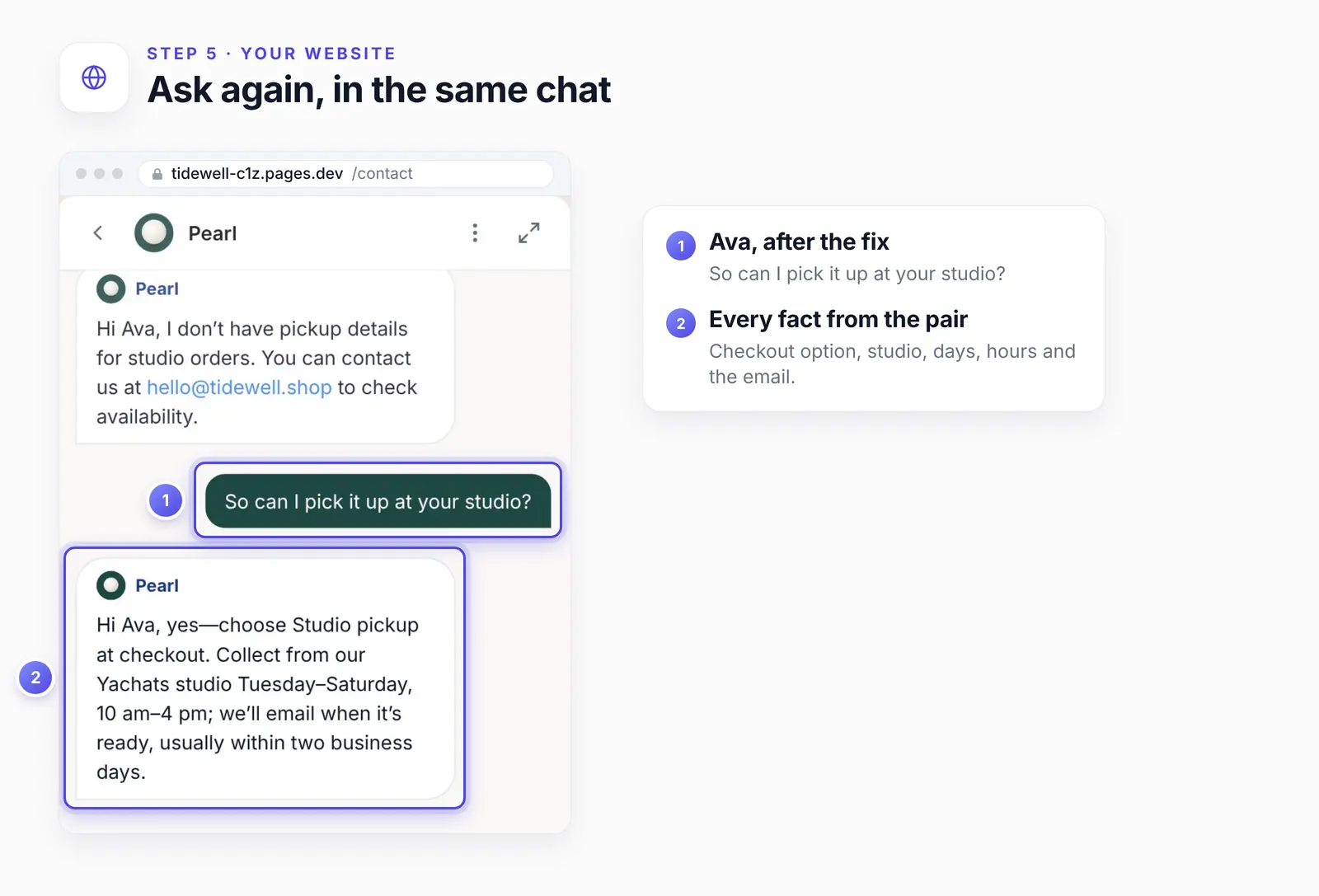
The reply isn't a copy of the pair. It greets Ava by name and matches her shorter question. Every fact made it through: the checkout option, the studio, the days and hours, and the email.
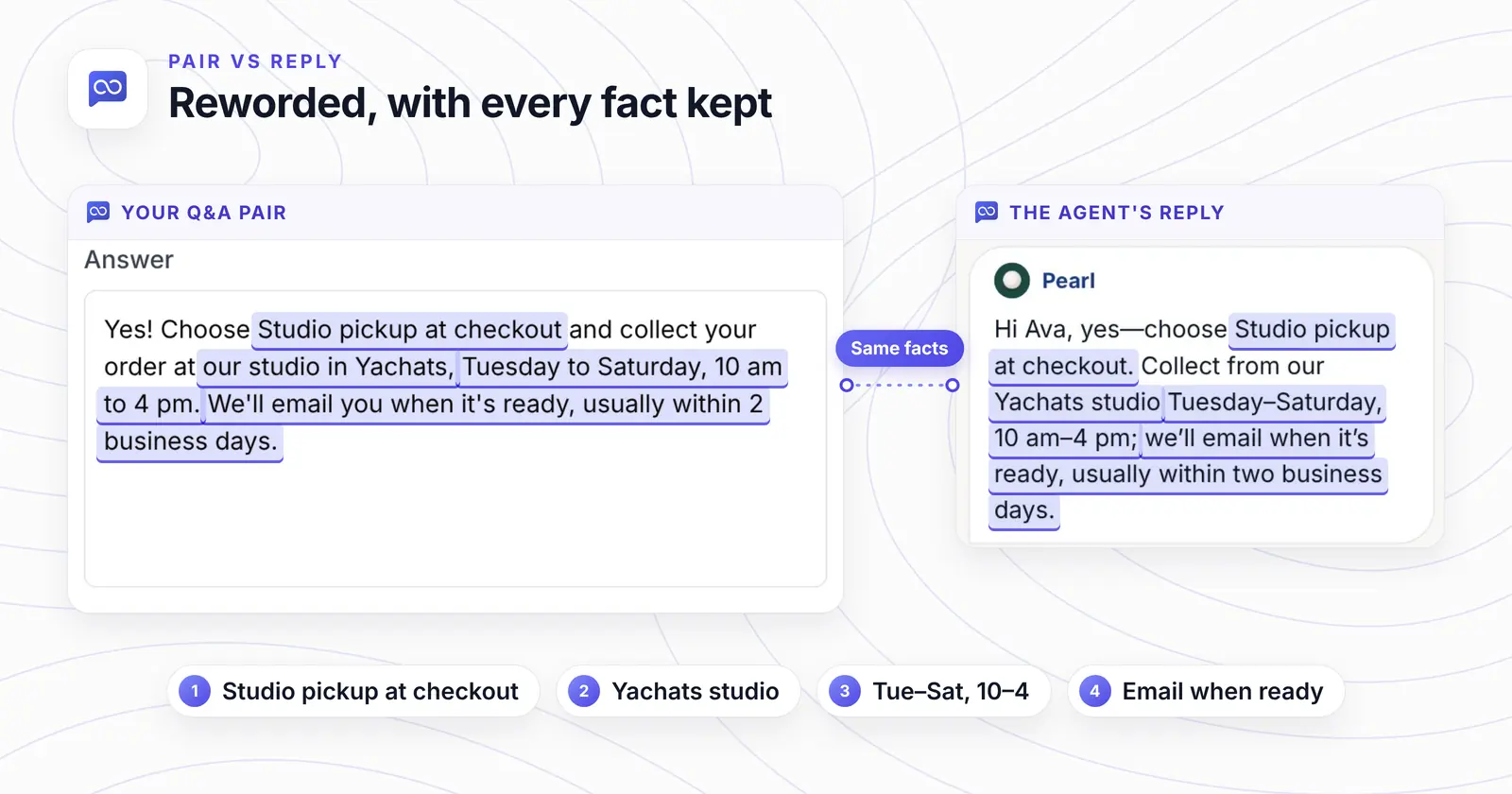
The chat began before the fix, and its very next reply already used the pair.
Could your agent take a correction this fast? |
Step 6: Check the conversation in your inbox
Back in Conversations, Ava's thread now shows both replies a few lines apart: the gap, then the fix. Keep that thread as your record that the pair works.
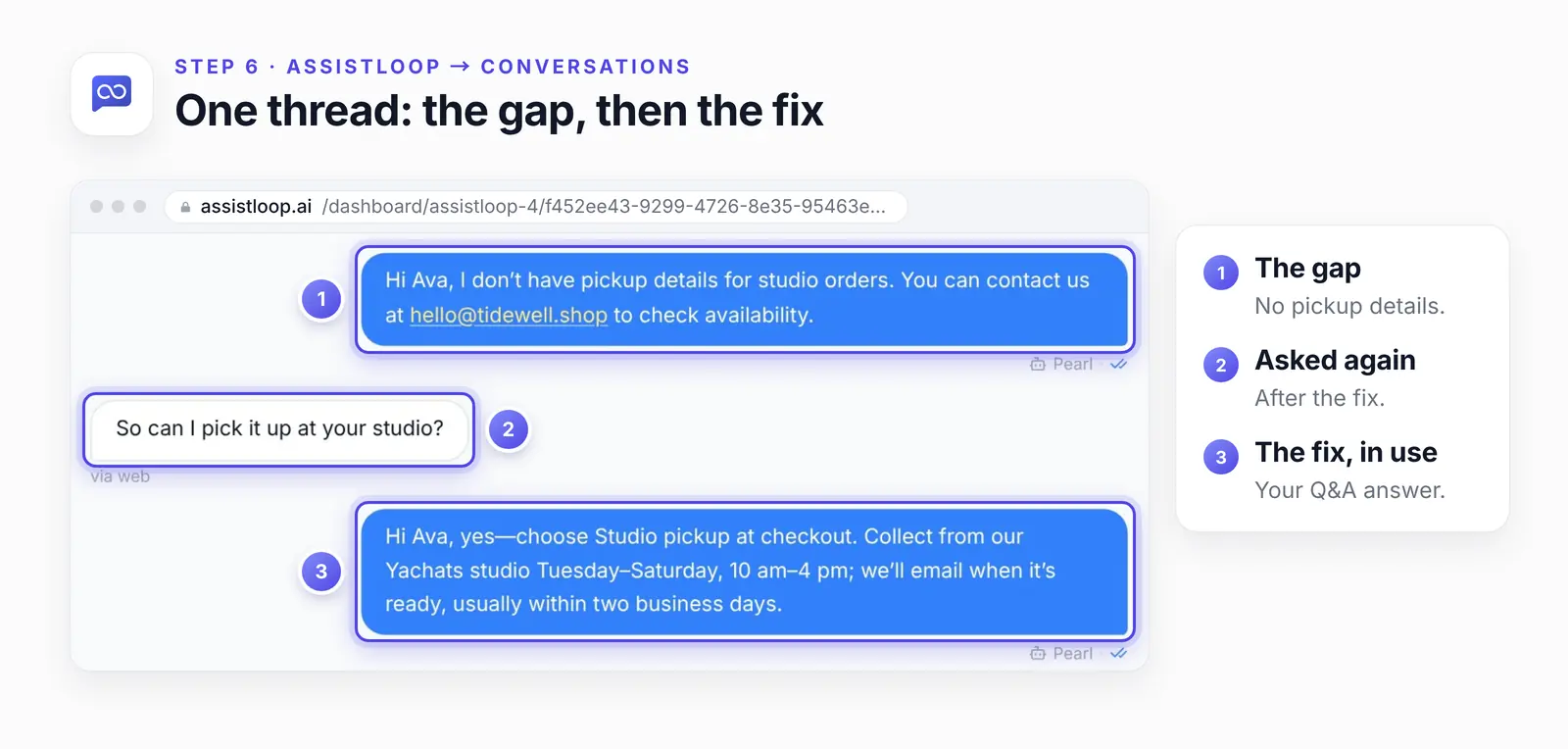
If the answer is still wrong
If the same question still gets the old reply after you train the pair, check these three things first.
The pair isn't trained yet. It only counts once its row shows Trained and Used in answers.
It went to another agent. Q&A pairs belong to one agent, so check it's the one on your site.
A page still says the old thing. Retrain or delete that source, as in rows 2 and 3 of the table.
How we tested this
The chat: Ava Brooks's chat on the demo shop's Contact page, in our AssistLoop account. Both of the agent's replies are quoted word for word.
The fix: we added the pair on camera on 18 October 2026, clicked Save and Train, and after the fix asked again in the same chat.
The site: Tidewell Ceramics is made up. Its Contact page has the studio address and no word on pickup, which is why the first reply came up empty.
The screens: steps 1, 2, 5 and 6, the trained row, the chat cards in the first figure and the right half of the proof are frames from that recording. The step 3 and 4 forms, the Q&A card in the first figure and the left half of the proof show the saved pair. We captured it in its View and edit dialog the same day, at a narrow width so the text stays legible.
The figures: each is a crop of those screens, with numbered rings and enlarged details laid over it. No on-screen text was changed.
The table: row 1 is the fix filmed here. The other rows come from AssistLoop's settings and the guides linked in them, and weren't filmed for this post.
What to do next
Pick the three questions your customers ask most that touch money, dates or policy, and put each one to your agent today. Any reply that hedges or guesses gets a row from the table. Adding many files and long snippets? Storage for them depends on your plan, and the pricing page sets it out.
Frequently asked questions
Why is my AI support agent giving wrong answers?
Usually the content, not the model: read the bad reply first. "I don't have" points to a missing fact. A confident but dated detail points to an old page, or to a second source that says something else. Swap the model last.
Can I correct the answer right in the conversation?
No. The AssistLoop inbox lets you copy an AI reply, not edit it. You change what the agent knows in Data Sources. The next reply uses it, even in the same chat, as Ava's did.
How do I stop the agent from making things up?
Put the missing fact in Data Sources, then give the agent a rule for gaps. A line to start from in its instructions: "If your sources don't cover a question, say you don't know and offer to pass the chat to the team." Researchers at OpenAI and Georgia Tech argue that models guess because their training and evaluation reward guessing over admitting uncertainty (September 2025). Pearl's "I don't have pickup details" is the behaviour you want while a fact is missing.
Will a better AI model fix wrong answers?
Rarely on its own. No model can answer from a fact it was never given, so fix the knowledge first. If you do switch AI models, run your test questions again afterwards.
Should I use a Q&A pair or a text snippet?
A Q&A pair holds one exact answer to a question people ask often. A text snippet suits a whole policy, or anything with several parts.
How long does training take?
A few seconds for one pair. The row's status tells you when it's live: it switches to Trained and Used in answers.
Ava had her pickup answer after the fix, in the chat she started. The next shopper who asks about pickup gets the days and hours, not the gap. So open Conversations now, find one reply from last week where your agent said it didn't have something, and fix that one today. If you don't have an agent yet, set one up in AssistLoop and correct it the same way, then put it on any website with one snippet.
 | Written by AssistLoop Team We build AssistLoop, an AI support agent that answers customers from your own website and documents, and hands the chat to your team when a person should step in. ★★★★★ "I appreciate being able to give access to my managers, so they can help build a database of answers." Jason K., Managing Director, on G2 |
Build Custom AI Chatbot for Your Business FREE
Create intelligent AI agents that handle customer support, boost conversions, and work 24/7 for your business.
Build Your Agent