How to Let Your AI Support Agent Check Order Status
A customer who types "where is my order?" wants a status, a carrier and a day, and your website has none of them. These WISMO ("where is my order") questions need order tracking data from your order system. This guide gives your AssistLoop agent one Custom API action that looks up an order by its number. It takes about ten minutes if your store can already return one order from a web address; Shopify and WooCommerce stores get notes below.
 AssistLoop Team15 min read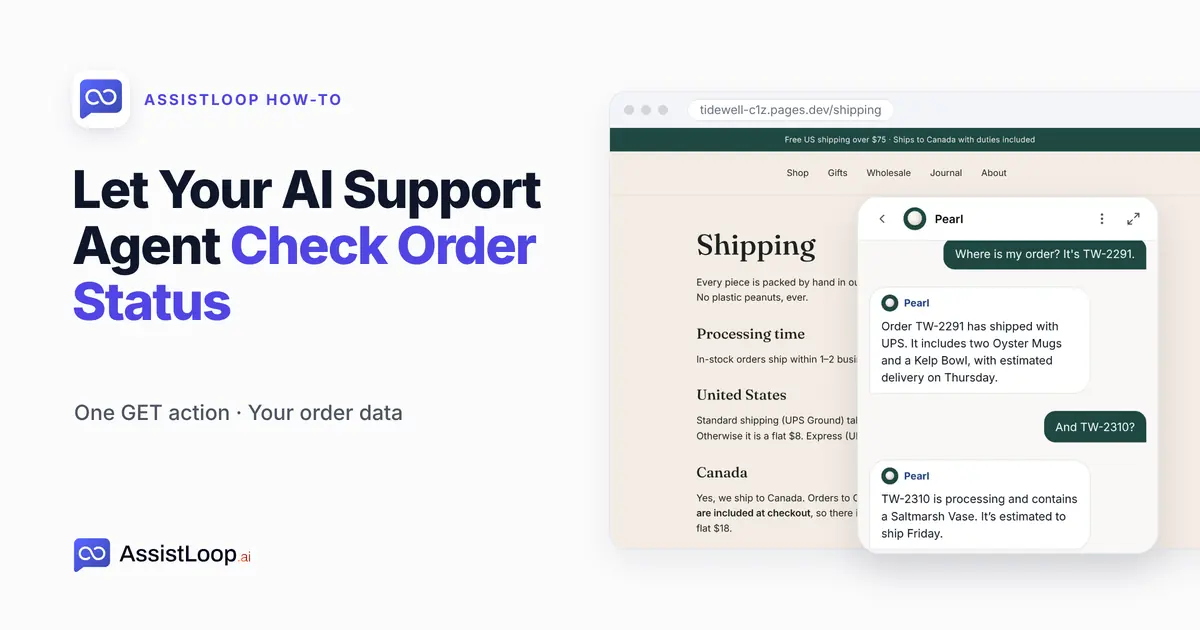
On this page
Last updated: October 2026. We built the action on camera on 16 October 2026, on a demo shop, and asked the agent the same question before and after.
Quick answer
|
A customer bought two mugs and a bowl last week. On Saturday evening they open your Shipping page, click the chat and type: "Where is my order? It's TW-2291."
The agent knows your shipping times, your carriers and your free-shipping threshold, because they're on that page. It doesn't know about TW-2291. So it says what it can:
I’m sorry, I don’t have a live status update for order TW-2291. You’ll receive a tracking link by email as soon as it ships.
Polite, and no help: the order shipped on Tuesday. The agent pointed elsewhere instead of answering. So the customer emails you anyway, and you look it up on Monday.
That second round of chasing is common. Citizens Advice asked UK shoppers about their latest parcel. On 19 November 2025 it reported that "of the people who had experienced a problem with their delivery, almost half (47%) had a further issue trying to resolve the problem, such as a slow response, issues with automated systems (such as a chat bot) and having to contact a firm multiple times to get a response" (Citizens Advice).
Our test bench is Tidewell Ceramics, a stoneware studio we invented. It has a demo site at tidewell-c1z.pages.dev, a small orders API and an AssistLoop agent named Pearl.
The 2-minute video runs through the same build, from the dead-end reply to the carrier and the delivery day.
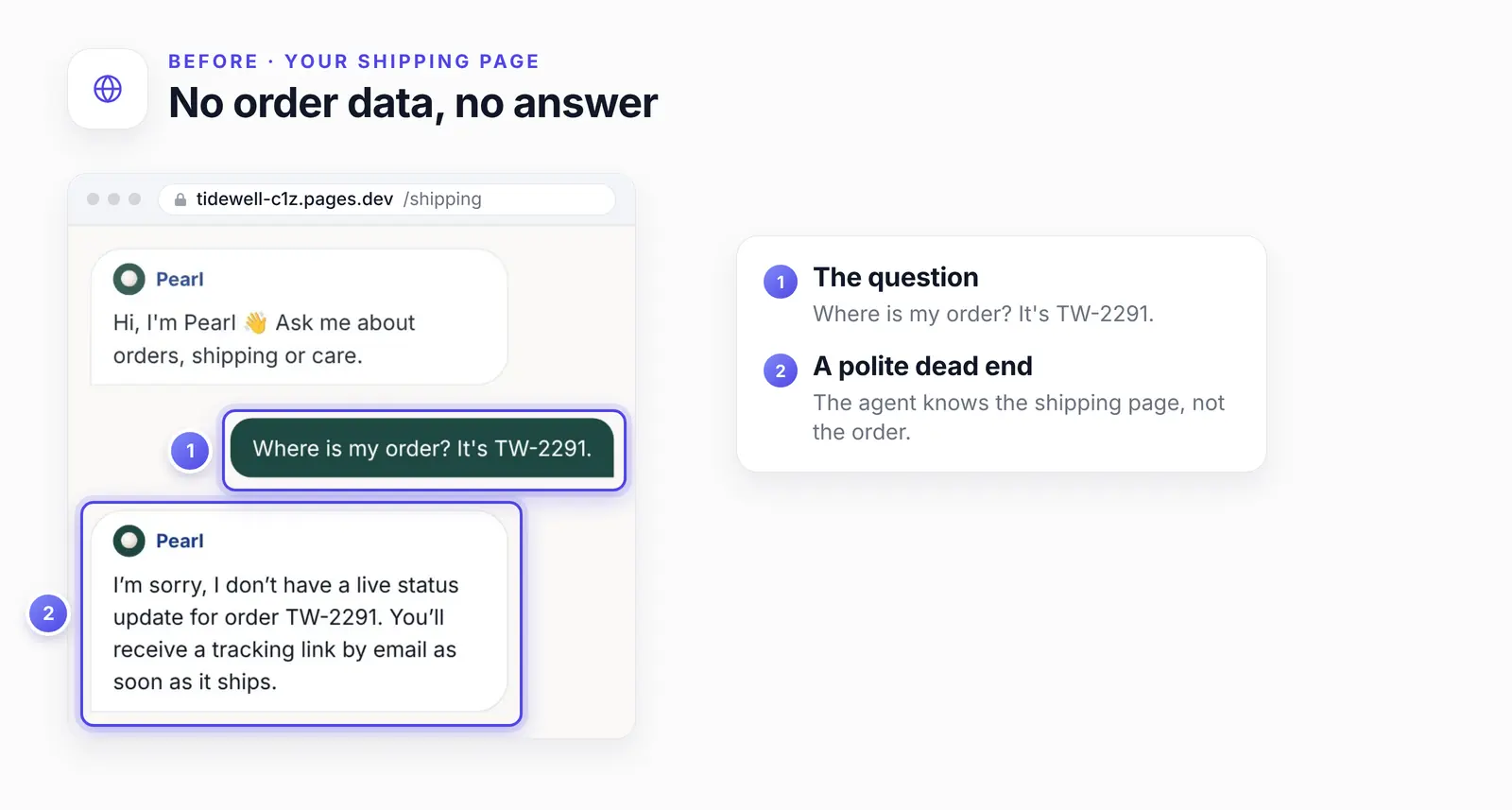
More training won't change this reply. No page on the site knows where TW-2291 is.
What you need
You need actions on your plan, an address that returns one order, and your order number format.
A plan with actions. AssistLoop's actions page says "Actions start on the Basic plan"; see AssistLoop pricing.
An address that returns one order. In AssistLoop's words, "an HTTP endpoint the agent can reach". If your store has none, a developer has to build a small one, shaped like the next section.
Your order number format. Ours look like TW-2291, and the action's description says so.
What your orders address should return
Your orders address should answer a GET with ?order_id= by returning that one order's status, carrier, dates and items as JSON, and a clear error when the number is wrong or missing. For TW-2291 the request looks like this:
GET https://tidewell-c1z.pages.dev/api/orders?order_id=TW-2291 |
And this is what the address sent back (HTTP 200):
{ |
An address like this works with the builder and is safe to hand to an agent when it follows four rules.
It takes the number as ?order_id=, since the builder won't accept a placeholder in the URL.
It returns status, carrier, dates, items and a tracking number or tracking link if you have one, and nothing private. Items are fine once rule 3 is in place.
It answers only when a second fact, such as the checkout email, matches the same order. Our demo skips this check because its orders are made up; the safety section below shows how to add it.
It says clearly when something is wrong.
The agent can only pass on what the reply contains. Ours has no tracking field, so no tracking link reached the chat. If yours returns one, confirm in a test chat that the agent includes it; we didn't film that case.
Ours sends these errors for an unknown order (HTTP 404) and a missing number (HTTP 400):
{"error": "Order not found", "order_id": "TW-9999"} |
If your orders live in Shopify or WooCommerce
Put a small read-only endpoint in front of the store that takes ?order_id= and the checkout email. AssistLoop has no ready-made order connection for either platform. Besides its own lead and ticket actions, its ready-made actions cover Calendly, Cal.com and HubSpot, and none of them reads orders. The Custom API action points at an address you control.
WooCommerce reads one order at /wp-json/wc/v3/orders/ORDER_ID, with the id inside the path (WooCommerce REST API docs). The builder wants the number as a parameter, and the full record carries billing and shipping details. Use a key with "Read access" only.
Shopify serves orders through the GraphQL Admin API's Order object. It needs the read_orders access scope and, by default, reaches only the last 60 days of orders. Its displayFulfillmentStatus field is the status to pass on.
Whichever platform you run, that endpoint reads the order with a read-only key and returns only the fields above.
Why training can't answer "where is my order?"
WISMO questions ask for data training never holds. Training covers what's true for everyone, like shipping times. An order's status belongs to one customer and changes by the hour. AssistLoop's actions page says the agent "reads it from your system at the moment it is asked, so the answer is never stale."
| Aspect | Action | Training |
|---|---|---|
| Knows | One order | Your policies |
| Fresh | Live | Last retrain |
| Says | TW-2291 shipped | Ships in 1–2 days |
Step 1: Add a Custom API action
In AssistLoop, open your agent and click Agent Actions in the sidebar. Click Add Action at the top right. In the dialog, find Custom API action and click its Create Action button.
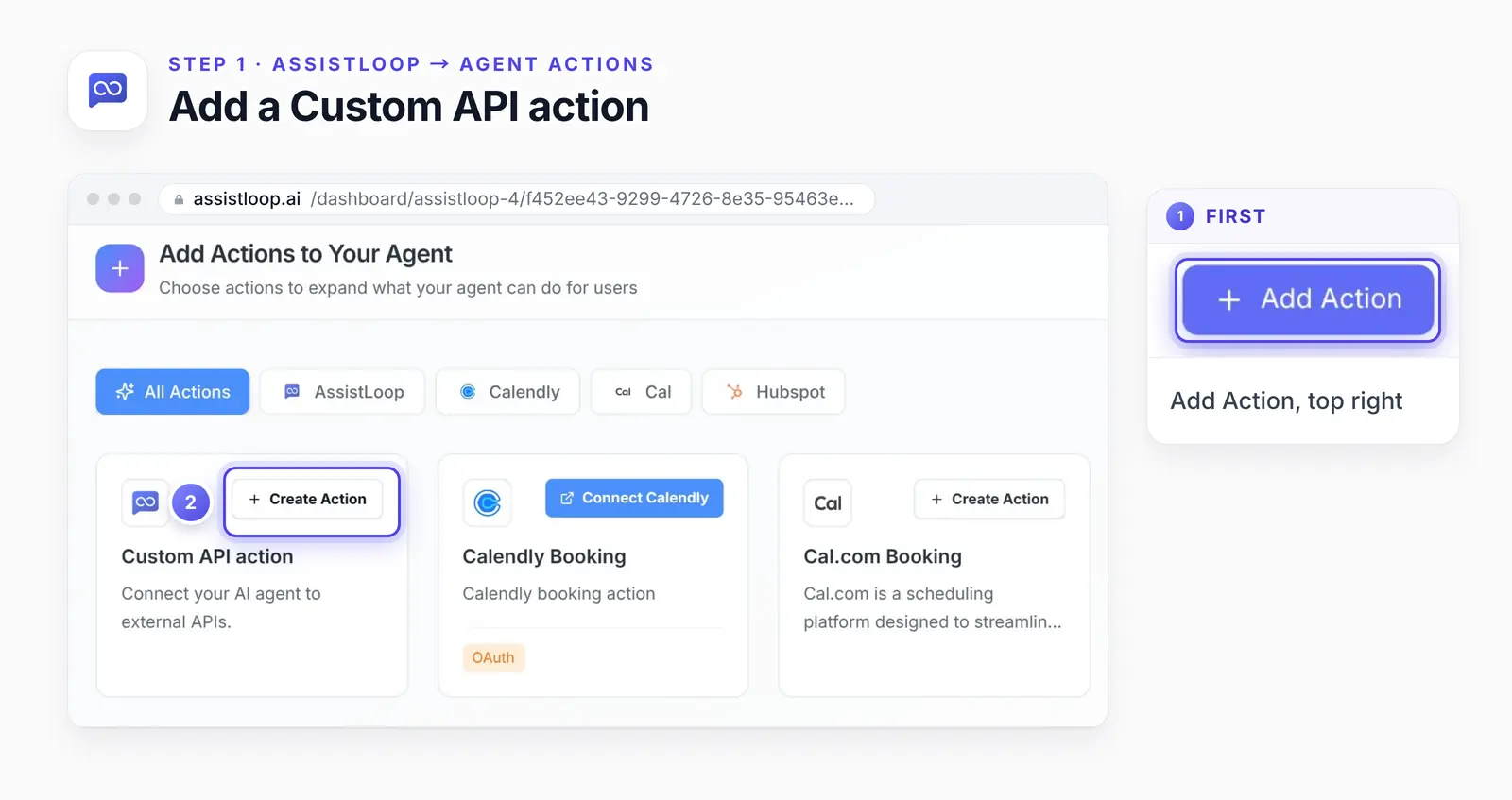
Calendly, Cal.com and HubSpot have their own actions. Your order system goes through Custom API action.
Step 2: Name it, and say when to use it
Under Basic Information, give the action a name. We called ours "Track an order".
The Action Prompt decides when the agent calls the action. Ours reads: "Use this when a customer asks where their order is or shares an order number like TW-2291." Then click Continue to API Setup.
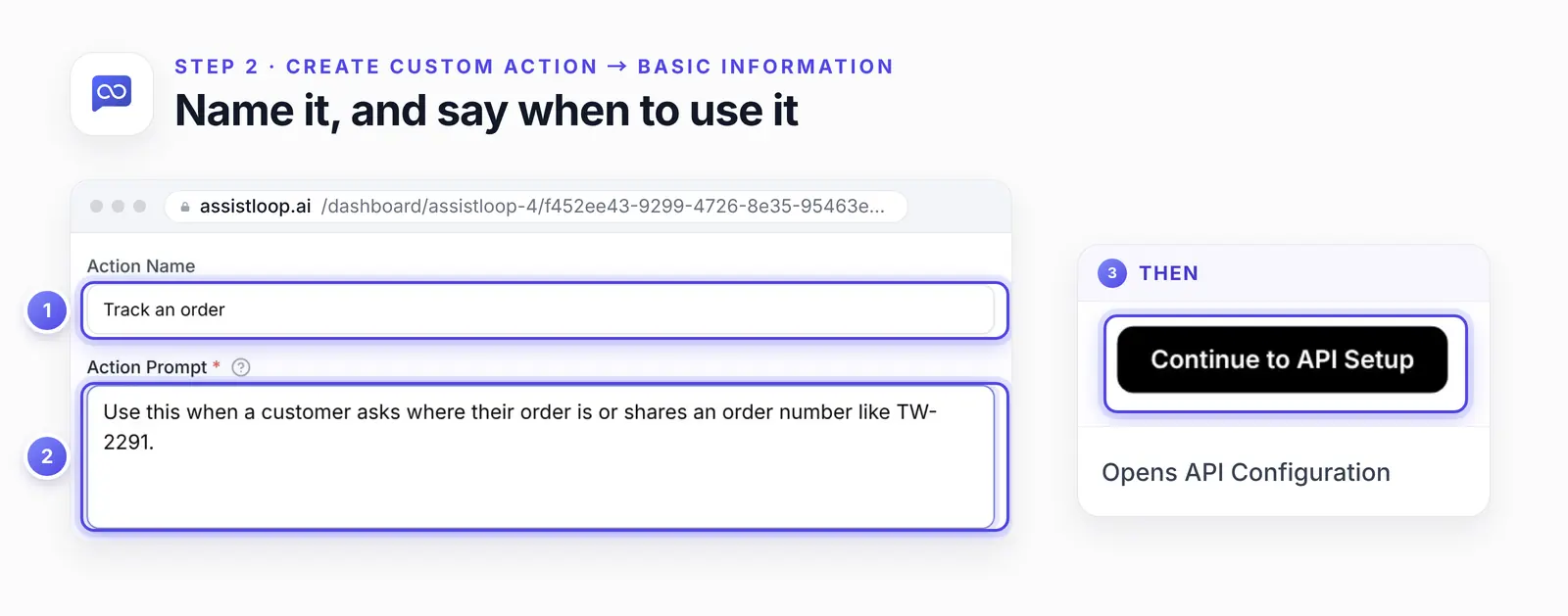
An example order number in the prompt helps the agent recognise one in a customer's message.
Step 3: Set the request to GET and paste your orders address
Under API Configuration, open the Request menu and choose GET. The builder starts on POST, so this is easy to miss. Paste your orders address into the URL field. Ours was https://tidewell-c1z.pages.dev/api/orders.
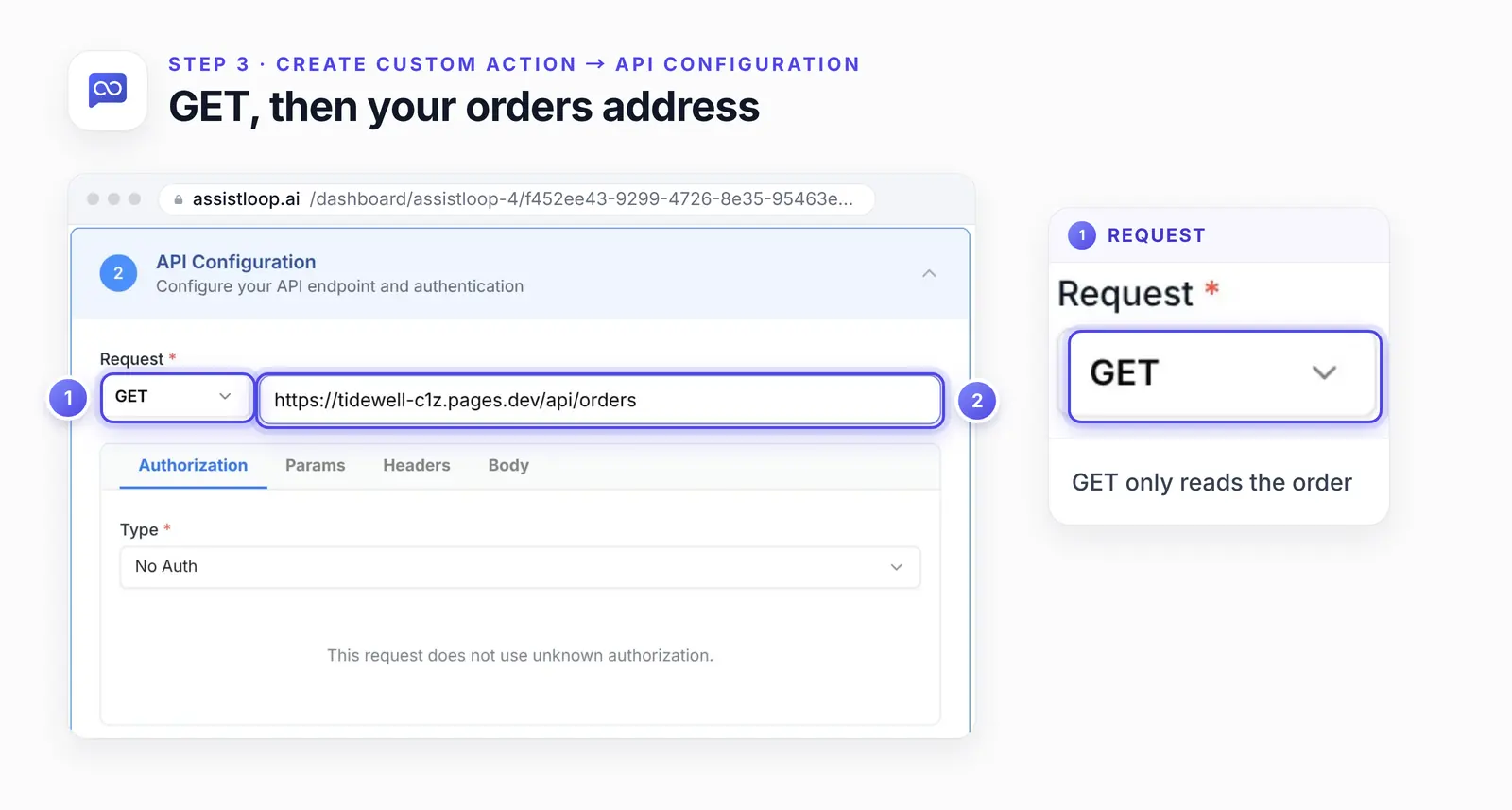
A status lookup only needs to read. GET can't change the order it asks about.
Leave the order number out of the address. The builder rejects placeholders like {order_id}, and the number arrives as a parameter in the next step.
If your address needs a key, add it under Authorization. AssistLoop advises "the narrowest credential that does its job" for each action. Here, that's a key that can only read orders.
Step 4: Add a required order_id parameter
Open the Params tab and click Add Parameter. Fill it in like this:
Key: order_id, the name your API expects.
Required: ticked, so the agent should ask for the number before it calls (test this, see below).
Description: what the agent should put there. Ours: "The customer's Tidewell order number exactly as they wrote it in the chat, e.g. TW-2291".
Default Value: empty. The troubleshooting list below explains why.
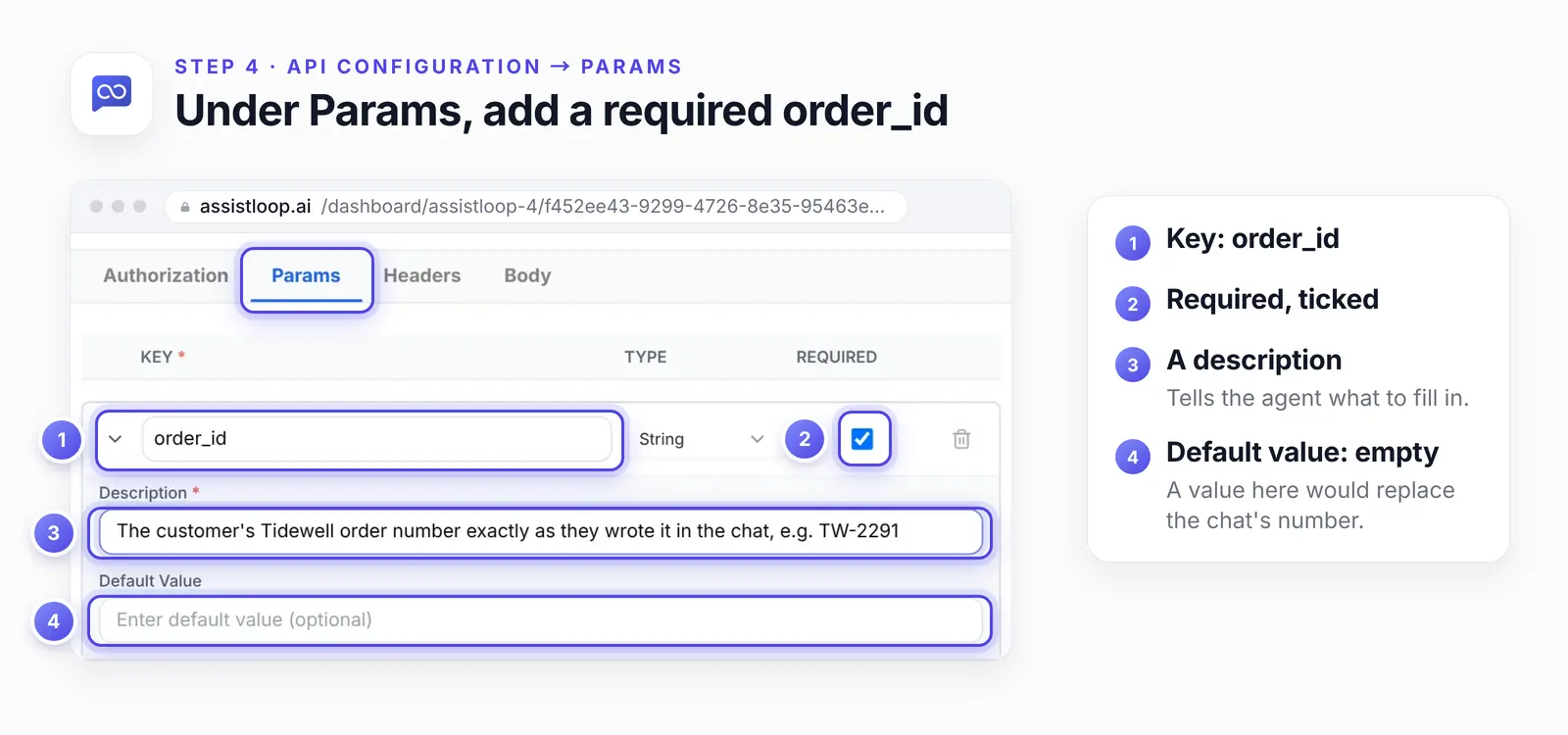
The agent reads the description to decide which part of a message is the order number.
Step 5: Mark as Complete, then Create
Click Mark as Complete at the bottom right of the API Configuration panel. Then click Create in the Unsaved Changes bar at the bottom of the page. The action shows up in Agent Actions, already switched on.
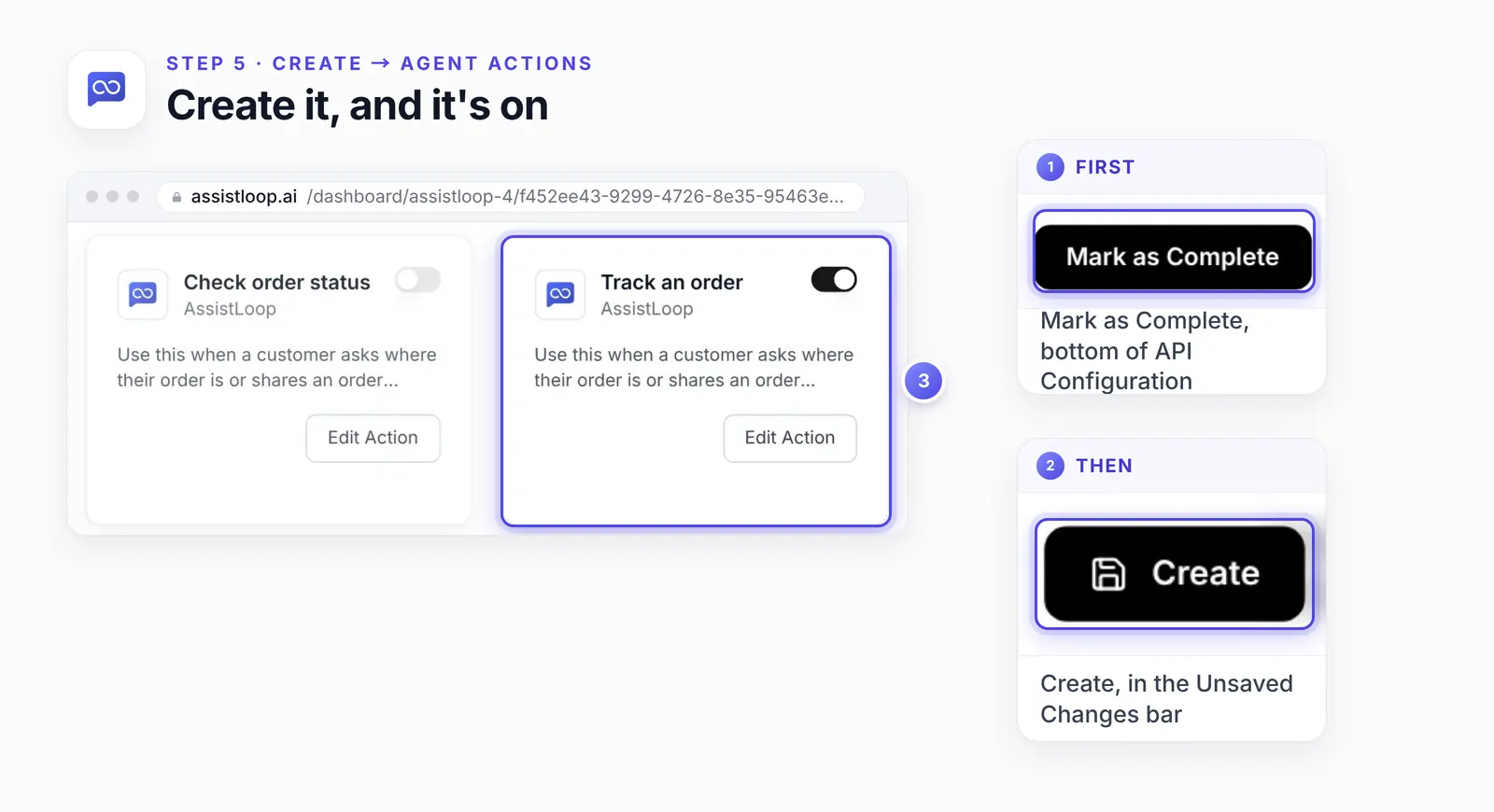
We switched off our older order action, so only one action answers order questions.
Step 6: Ask again
Open your site, start a new chat and ask the same question. We asked "Where is my order? It's TW-2291." on the Shipping page. The agent replied:
Order TW-2291 has shipped with UPS. It includes two Oyster Mugs and a Kelp Bowl, with estimated delivery on Thursday.
Then a second order in the same chat, "And TW-2310?":
TW-2310 is processing and contains a Saltmarsh Vase. It’s estimated to ship Friday.
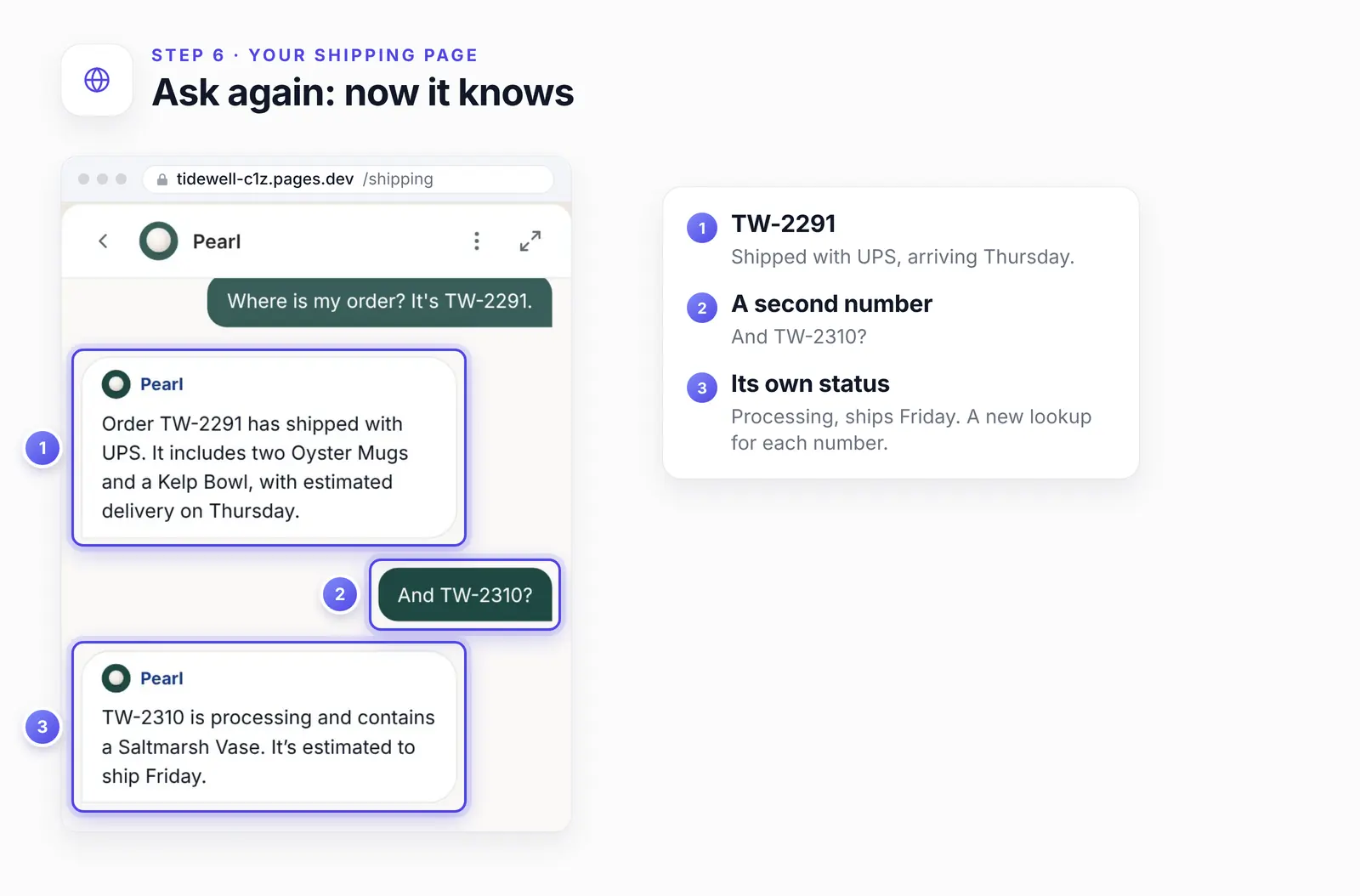
The follow-up was only "And TW-2310?". The agent took the rest of the question from the conversation.
We checked the first answer against the JSON above. Every fact is there: shipped, UPS, two Oyster Mugs and a Kelp Bowl, Thursday. The reply had no tracking number, and the agent didn't invent one.
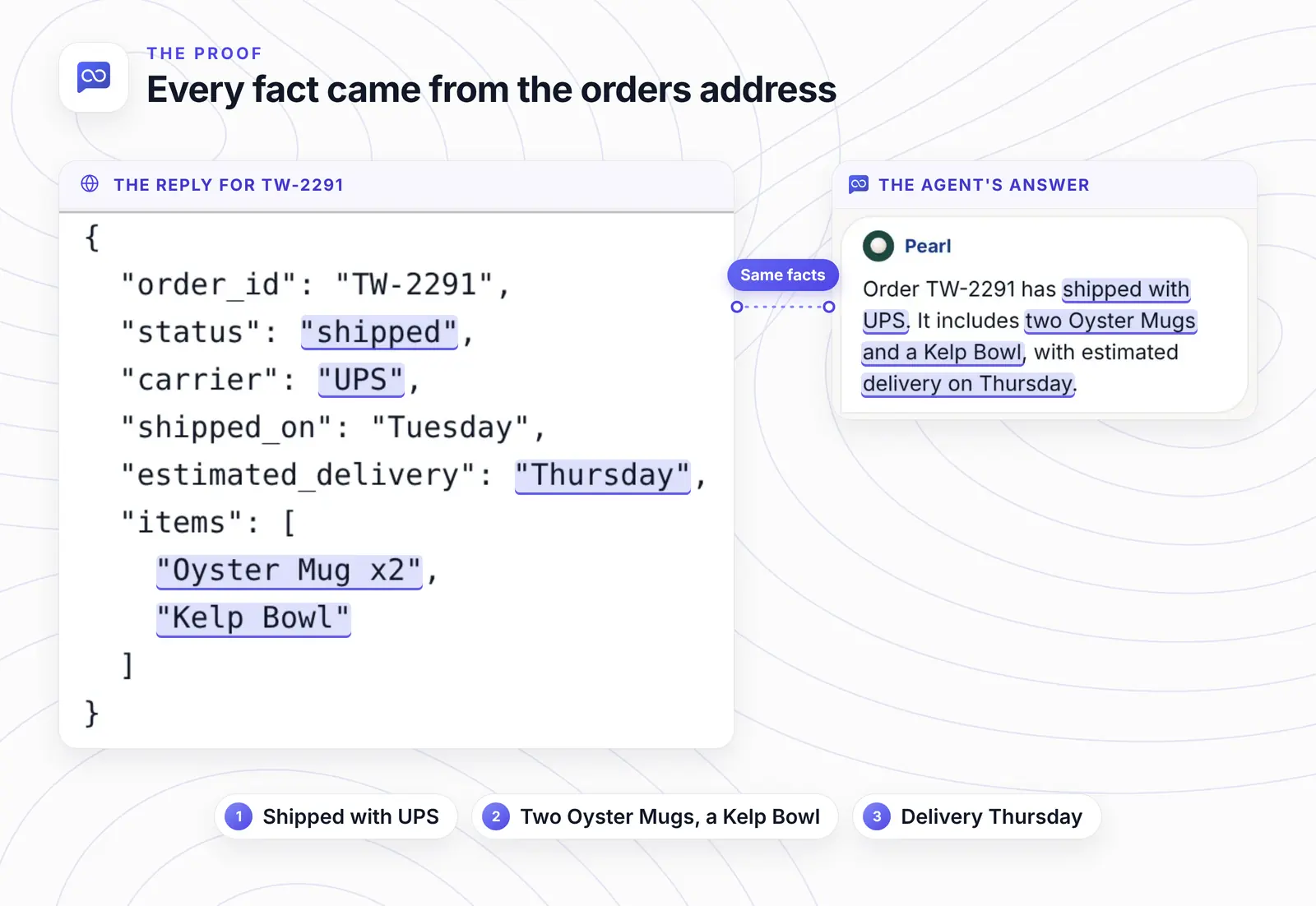
Each highlighted phrase in the answer maps to a field in the reply. Nothing in the answer comes from anywhere else.
Try the unhappy paths too
Test four messages before launch, each in a fresh chat: a known order, an unknown one, no number, and a wrong email.
A number you know exists. It should come back with its status.
A number that doesn't exist, such as TW-9999. The endpoint answers 404, so the agent should ask the customer to check the number.
"Where's my parcel?" with no number. The parameter is required, so the agent should ask for one first.
Once you've added the email check, a number that exists with the wrong email. It should get the same reply as an unknown number.
We filmed only the first kind. Read the replies to the others before launch. Tighten the Action Prompt or the endpoint's error text if any reply is vague.
Want order questions answered in the chat? |
Keep order lookups safe
Make your endpoint return only status, carrier, dates and a tracking link, and answer only when the order number and the checkout email match. Anyone with an order number can ask about that order in your chat, so settle this before you connect it.
Return only what a stranger may see: status, carrier, dates and a tracking link. Add items once the email check is in place. Never return addresses, emails or payment details.
Use a read-only key. The action never needs to write.
Check a second fact in the endpoint, not the chat, before answering.
For signed-in customers, AssistLoop advises you to "pair anything account-specific with verified user identity". Its Identity Handoff attaches a signed-in user to the chat, so your inbox shows who is asking. We didn't test whether that identity reaches an action, so keep the email check in the endpoint.
The OWASP API Security Top 10 ranks this risk first, as API1:2023 Broken Object Level Authorization (OWASP):
Every API endpoint that receives an ID of an object, and performs any action on the object, should implement object-level authorization checks. The checks should validate that the logged-in user has permissions to perform the requested action on the requested object.
A guest in your chat isn't logged in, and order numbers like TW-2291 run in sequence. Add the checkout email as a second required parameter.
Add the email check
Treat this as a starting point. We didn't film it, because our demo orders are made up. Back in Step 4, click Add Parameter again and fill in a second row:
Key: email
Required: ticked
Description: "The email the customer used at checkout"
Each lookup then carries both values, with the @ in the email sent as %40, the way a web address writes it:
GET https://shop.example.com/api/orders?order_id=TW-2291&email=jane%40example.com |
Have the endpoint answer only when the number and the email belong to the same order. A wrong pair should get the same "Order not found" as an unknown number, so the reply never confirms that an order exists.
When the status isn't the answer
A lookup settles "where is it?". Some order questions need a person or a ticket, so say which in your agent's instructions. A line to start from:
If an order shows delivered but the customer hasn't received it, or tracking hasn't moved in 3 days, offer to pass the chat to the team.
Delivered but not received. The carrier and the customer disagree, so pass the chat to your team.
Damaged, missing or wrong item. Have the agent open a support ticket and ask for an email.
Tracking that hasn't moved in days. Hand off; a person can chase the carrier.
Order not found twice. Hand off rather than ask a third time.
A change or a cancellation. A person decides, unless you build an action for it.
A tracking link in your shipping emails gives customers the answer before they ask.
If the agent still can't find the order
Check these in order: the switch, the method, a default value, then the endpoint itself.
The action is off. Check its switch in Agent Actions.
The method is still POST. Reading orders needs GET.
A default value is filled in. In our earlier testing, a default value replaced the number from the chat, so every lookup asked about the same order. Clear the field.
The prompt misses how customers ask. Add their words ("track", "parcel") to the Action Prompt.
The API rejects the request. Open your address with ?order_id= and one of your order numbers in a browser. If that fails, the agent's call fails too.
The form's test fails. Test API Configuration sends no parameter values, so our endpoint answered with the 400 error above. Test in a chat instead.
Two actions overlap. Switch off the older order action.
The agent keeps asking for the number. Put an example in the parameter's description, like our "e.g. TW-2291".
How we tested this
The chats: two chats on the demo shop's Shipping page, before and after the action, filmed on 16 October 2026 and quoted word for word.
The JSON: the proof figure shows the reply for TW-2291 in a browser on 18 October 2026. We requested the address again on 19 October 2026 for the code cards: same reply, plus the two errors.
The action: built on camera in Agent Actions. Afterwards Pearl kept the new action on and the old one off.
The screenshots: stills from the 16 October recording; the cover sets that chat over a later capture of the same Shipping page. The proof figure sets two crops side by side, and the step figures add rings and enlarged details on top of an unchanged interface.
Where to take it next
A booking reference, a repair job or a renewal date work like an order number: one GET action, one required parameter, a short reply. AssistLoop's agent actions page lists the other methods and authentication options.
If the agent gets a fact wrong from your pages rather than your API, the fix is a training source. Here's how to fix a wrong answer from your AI support agent.
Frequently asked questions
How does the agent know it's the customer's own order?
It doesn't, from the number alone. Order numbers usually count up, so anyone can guess the one after theirs. That's why the endpoint should also match the checkout email; the safety section above shows the setup.
What happens if the order number doesn't exist?
That's up to your endpoint. Whatever it sends back is all the agent has to work with, so give the 404 a short message written for a customer, such as "We can't find that order number. Please check your confirmation email."
Does this work with Shopify or WooCommerce?
Yes, through a small endpoint in front of the store. The Shopify and WooCommerce section above links each platform's order API.
Does the customer have to type the order number in a set format?
Customers can phrase the question any way they like. Our parameter description asks the agent to pass the number exactly as the customer wrote it, so expect "2291" or "tw 2291" to reach your endpoint as typed. We only tested numbers typed in the full format. Make the endpoint accept the common variants (lowercase, no prefix, spaces), or show your format in the description's example.
Can the agent change or cancel an order too?
Actions can also send POST, PUT, PATCH and DELETE requests, so it could. For status, keep GET and a read-only key, and leave changes to a person.
Which plan do I need for actions?
Basic or higher. The free plan covers training and the chat, so you can set up the agent first and add the order action after you upgrade.
Back to that Saturday evening. The customer asks about TW-2291, the agent reads the answer from your order system, and nothing waits in your inbox until Monday. Pick an order from yesterday's sales and send the test messages above. Once they come back right, give your own store an agent that knows its orders.
 | Written by AssistLoop Team We build AssistLoop, an AI support agent that answers customers from your own website and documents, and hands the chat to your team when a person should step in. ★★★★★ "It can connect to the data you have about a customer on your website through API and other methods…" Zara, Customer Service Manager, on G2 |
Build Custom AI Chatbot for Your Business FREE
Create intelligent AI agents that handle customer support, boost conversions, and work 24/7 for your business.
Build Your Agent