How to Make Your AI Support Agent Answer in Your Customer's Language
A tested guide to multilingual AI customer support in AssistLoop: the agent answers in the shopper's language from English sources, the widget Language setting translates its own words, and you translate your texts, suggested questions and pre-chat form.
 AssistLoop Team9 min read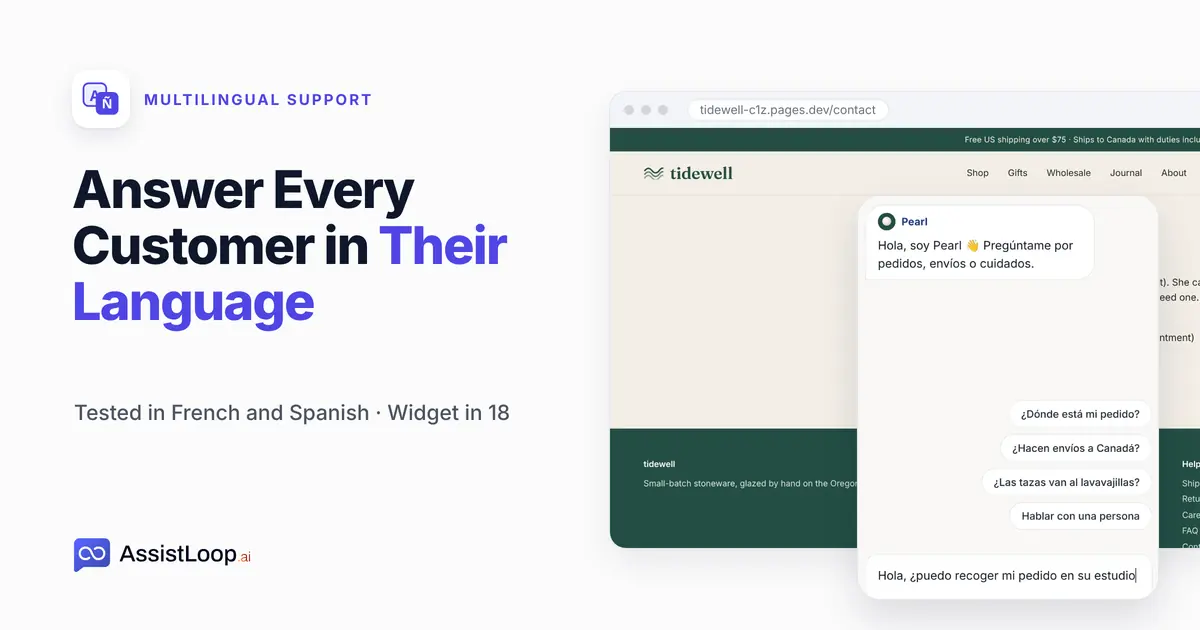
On this page
Shoppers from other countries ask in their own language, and a reply in English loses some of them. This guide shows what AssistLoop does on its own: the agent answers in the language each shopper writes, from English sources. It also covers what you translate yourself, because the widget's words and your own texts follow different rules. We tested it with two shoppers, one French and one Spanish; most of the work is typing translations.
Last updated: October 2026. We recorded a French and a Spanish shopper on Tidewell's live site in mid-October 2026, then put Pearl's widget back to English. On 24 October 2026 we opened the Language list again to count its languages.
Quick answer
|
A shopper in Lyon is looking at a pottery shop's catalogue and wants to know whether it ships to France, and how long it takes. She writes in French. The shop's pages are all in English.
That shop is Tidewell Ceramics, our fictional pottery brand, and its agent, Pearl, learned the Tidewell website in AssistLoop. Every screen below comes from Tidewell's site and Pearl's dashboard.
The video runs two and a half minutes: the French answer first, then the widget switched to Spanish and a second shopper.
What you need
An AssistLoop agent that already answers from your site; if you don't have one, sign up and Create Agent with your website address. Your pages can stay in one language. For the widget, you need the translations of your own short texts: the first message, the greeting, the suggested questions and, if you use one, the pre-chat form.
Who translates what
The agent's answers and the widget's words are two separate things. Here's what we saw, line by line:
| Shopper sees | Translated by |
|---|---|
| The agent's answers | Automatic |
| Built-in words | Language setting |
| First message, greeting | You |
| Suggested questions | You |
| Pre-chat form | You |
| New chat button | You, as a label |
| Skip, (optional) | Stays English |
The last row is a product limit. The pre-chat form's Skip button and (optional) tag stayed in English with the widget set to Spanish.
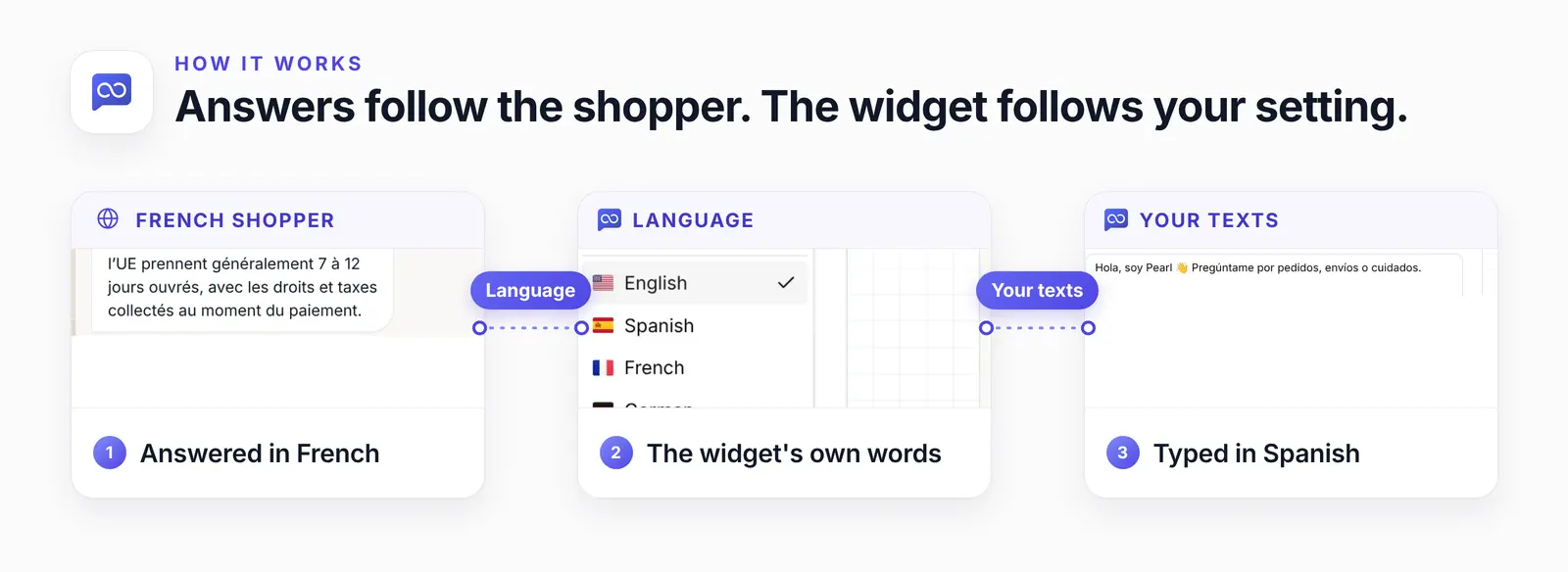
The answer follows the shopper; the widget follows your setting and your typing.
Shoppers notice. When the European Commission surveyed internet users in 23 EU countries for its 2011 Eurobarometer on language, its press release said: "Buying online is an area where people prefer to use their own language." 42% said they never buy online in a language other than their own (the survey, Flash Eurobarometer 313, is archived at the GESIS Data Archive as DOI 10.4232/1.10730).
Step 1: Let a shopper write in their language
There's nothing to switch on.
Our French shopper, Camille Dubois, asked on Tidewell's Shop page: "Bonjour ! J'habite à Lyon. Est-ce que vous livrez en France, et en combien de temps ?" The pre-chat form asked her name and email in English. Pearl then answered in French:
Bonjour Camille ! Oui, nous livrons en France ; les commandes vers l’UE prennent généralement 7 à 12 jours ouvrés, avec les droits et taxes collectés au moment du paiement. |
We checked it against Tidewell's English Shipping page, and every fact matches: EU orders take 7–12 business days, and duties are collected at checkout.
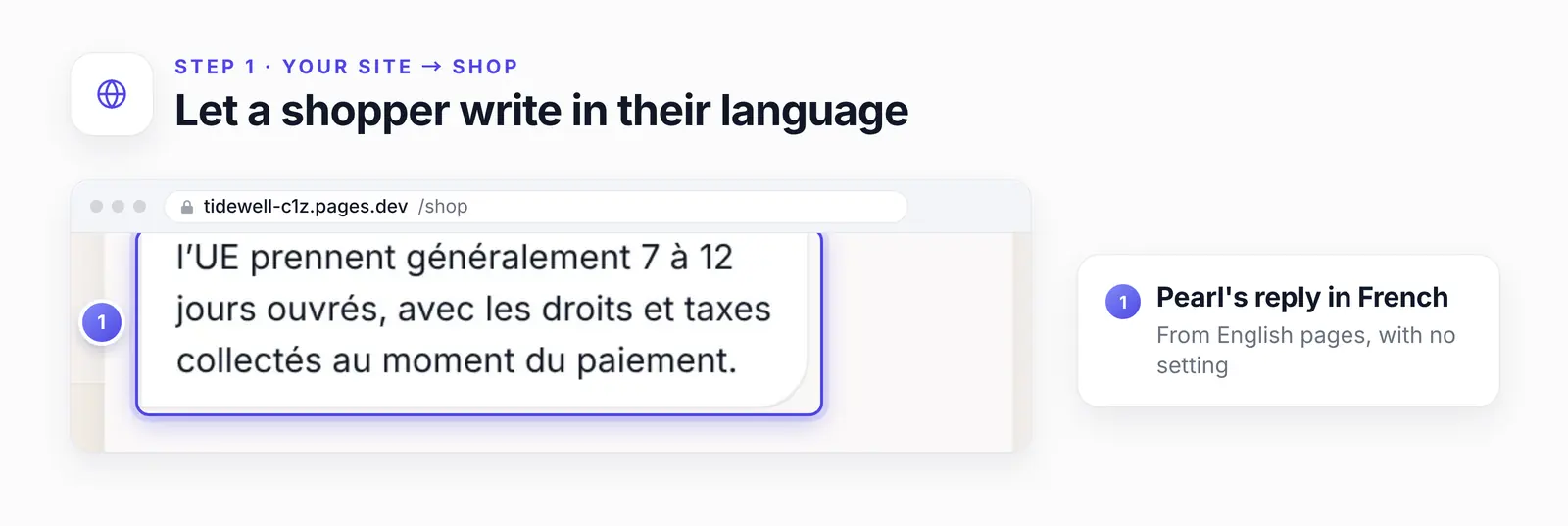
After the form, the widget scrolls so the reply's first line sits under the chat's header. The whole reply is quoted above.
The language of the first reply can slip. In our probes before filming, once in three tries a question in another language, asked right after the English form, got its first reply in English. Translating the form, as in Step 5, puts its questions in the shopper's language too; with the form in Spanish, our Spanish shopper's first reply came back in Spanish.
Step 2: Pick the widget's language
The widget's own words are the ones AssistLoop wrote, such as "No previous conversations" on its home screen and the Bad Response button under an answer. In your agent, open Widget Appearance, stay on Basic and open Language. The list has 18 languages; we picked Spanish.
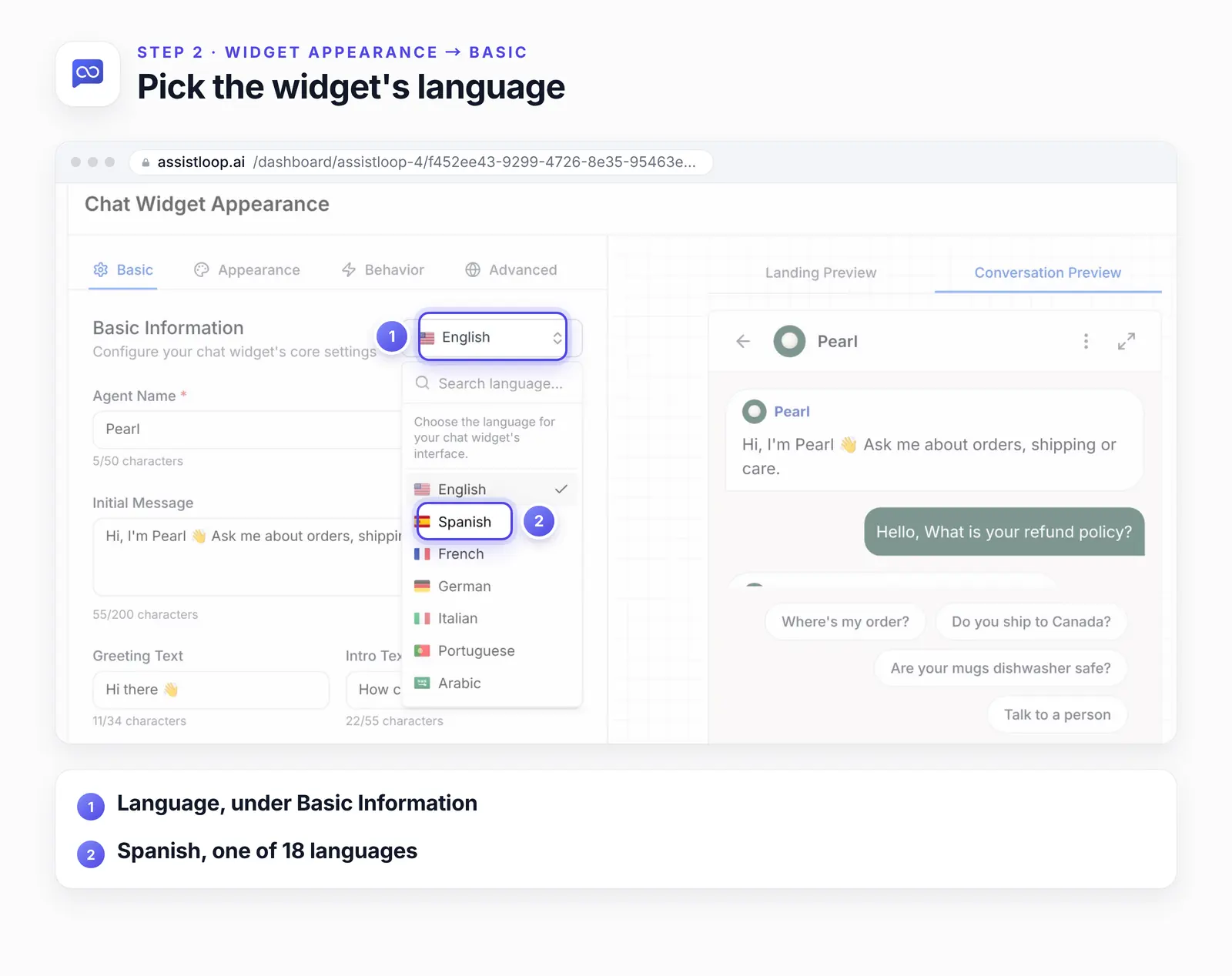
Step 3: Write your own texts in that language
Your own texts stay exactly as you typed them, so type them in the new language. On the same Basic tab:
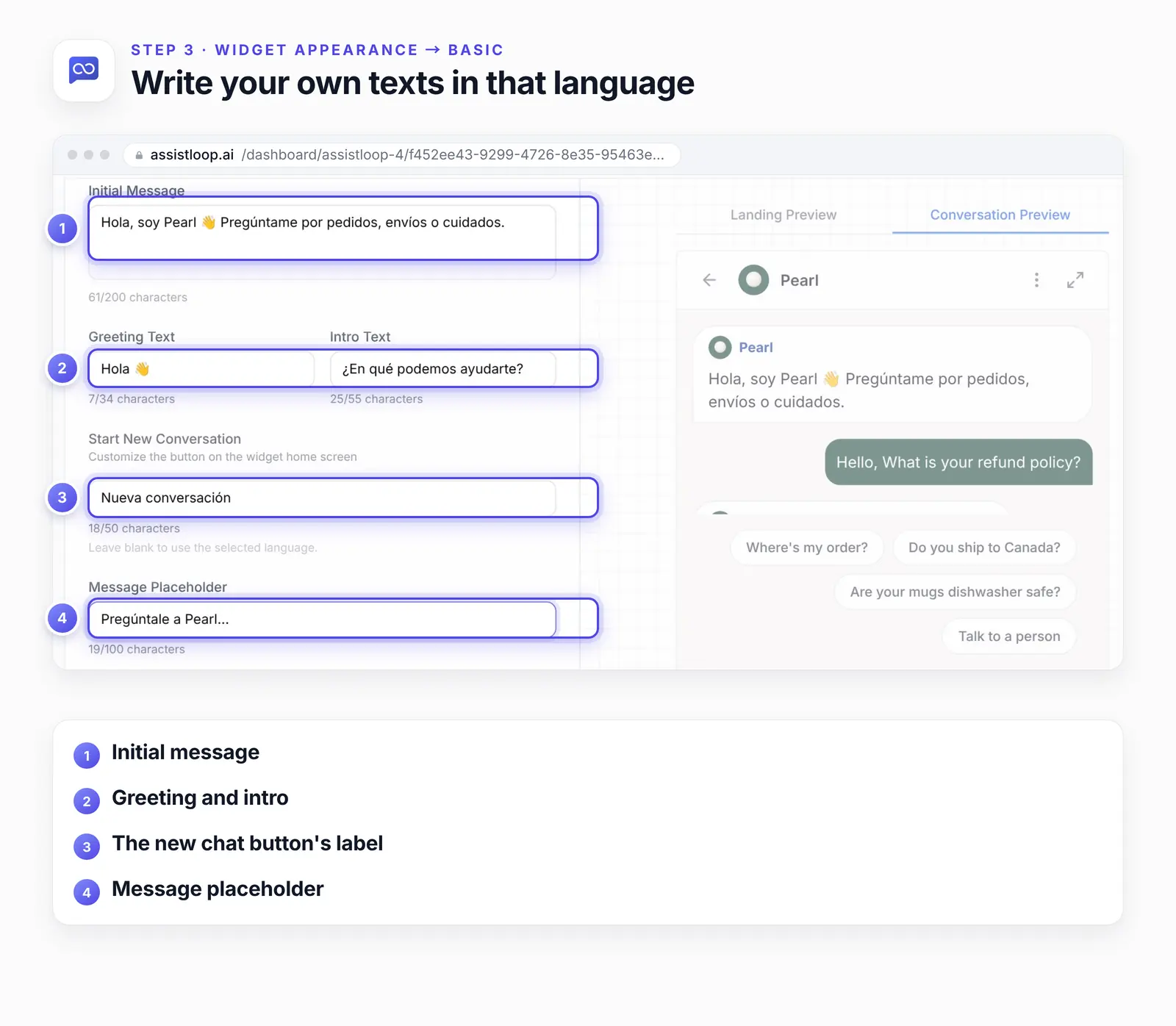
The first message updates in the preview; the suggested questions follow in Step 4.
The Start New Conversation field says to leave it blank to use the selected language. In our tests the button stayed in English until we typed a label, so type one.
Step 4: Translate the suggested questions
Open the Behavior tab. Under Quick Replies, retype each suggested question in the new language, then click Save.
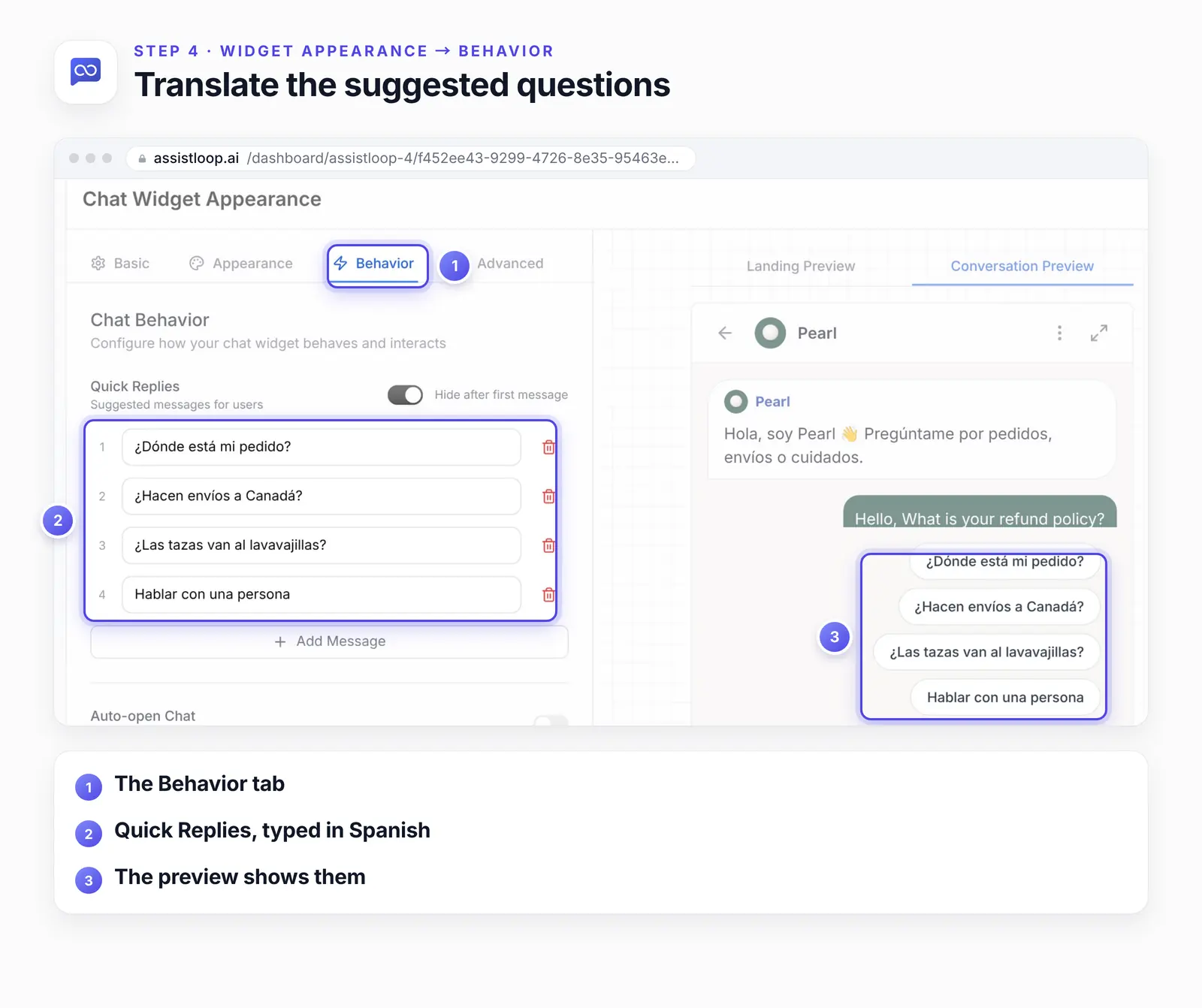
Step 5: Translate the pre-chat form
If you ask for a name and email before the chat, open Settings and find Pre-Chat Form. Type the title, the intro message, the completion message and each question in the new language, then Save.
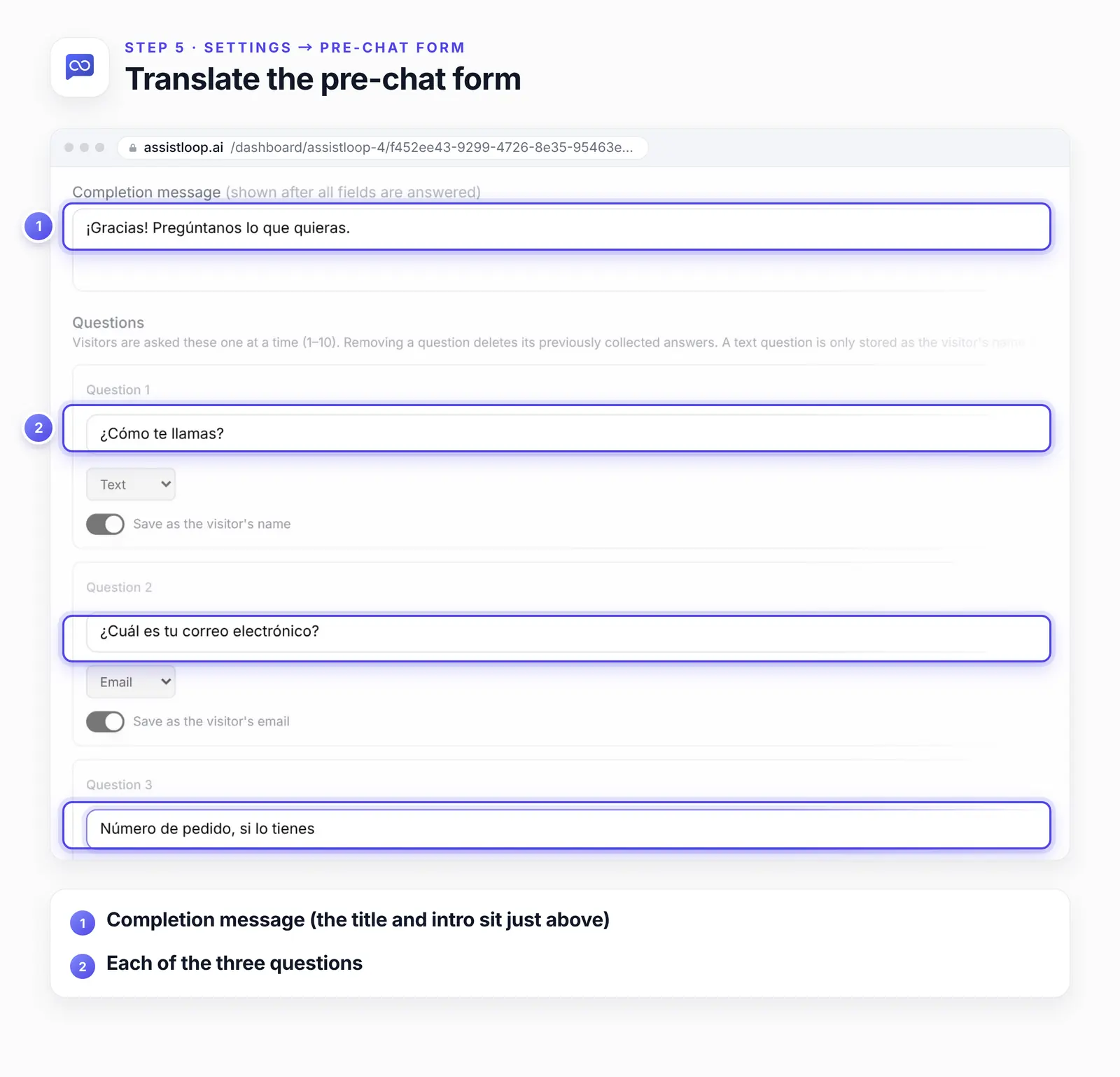
Translated questions still fill in the contact details: with Save as the visitor's name and the email switch on, the inbox showed Lucía's name and email. The pre-chat form guide covers those switches.
Step 6: Open the chat as a new shopper
Test in a fresh browser or a new private window. The widget remembers each visitor, and a browser that already chatted opens the old conversation, form already answered.
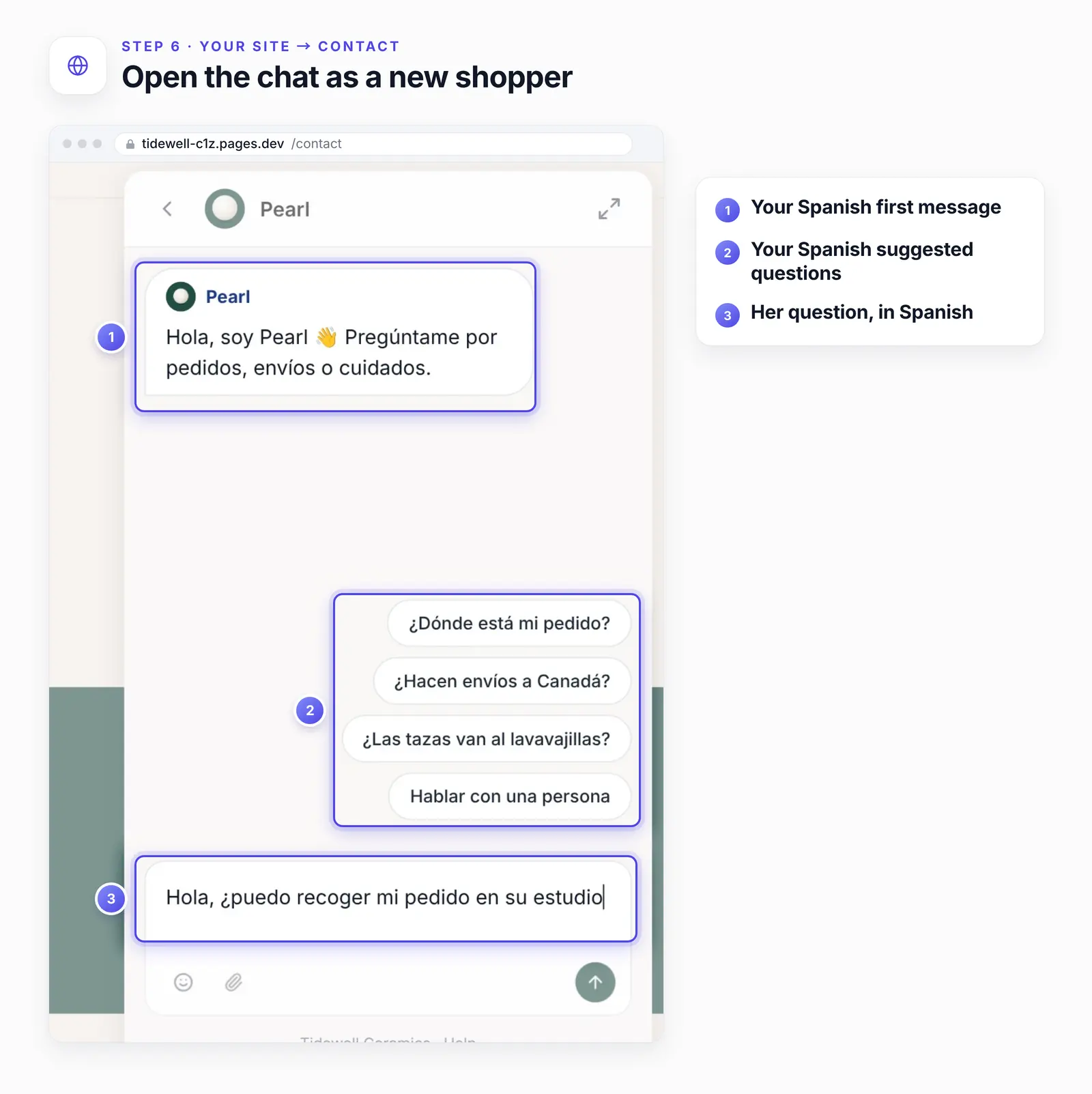
Our Spanish shopper, Lucía Romero, opened the chat on Tidewell's Contact page and saw its home screen and first message in Spanish. She asked "Hola, ¿puedo recoger mi pedido en su estudio?", answered the Spanish form, and Pearl replied:
Sí, Lucía. Elige “recogida en el estudio” al pagar y podrás recogerlo en nuestro estudio de Yachats, de martes a sábado, de 10:00 a 16:00; te avisaremos por correo cuando esté listo, normalmente en un plazo de 2 días hábiles. |
Step 7: Check each chat in your inbox
In Conversations, each chat stays in the language the shopper used, with the form as each shopper saw it. Your team reads it as it happened.
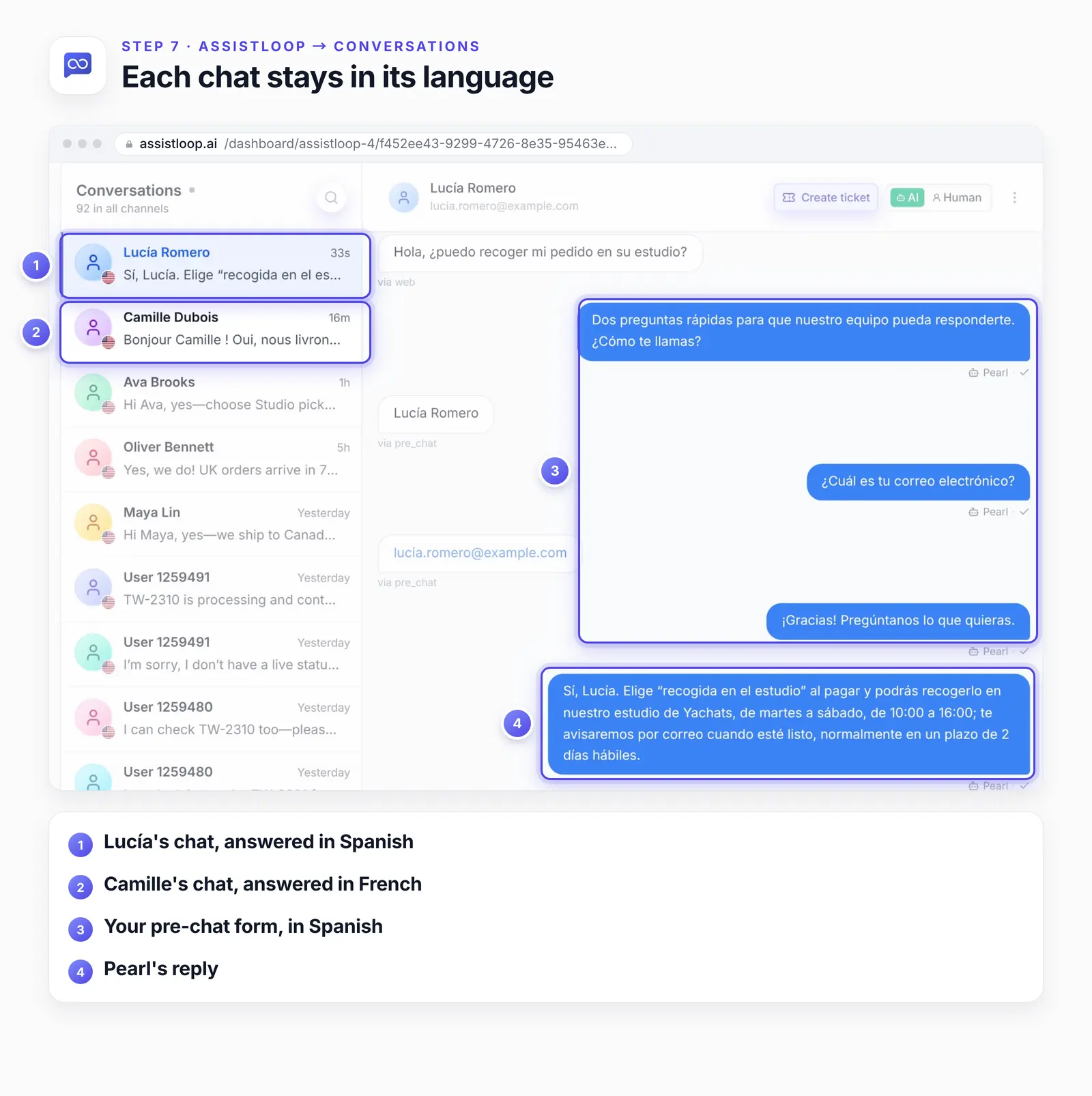
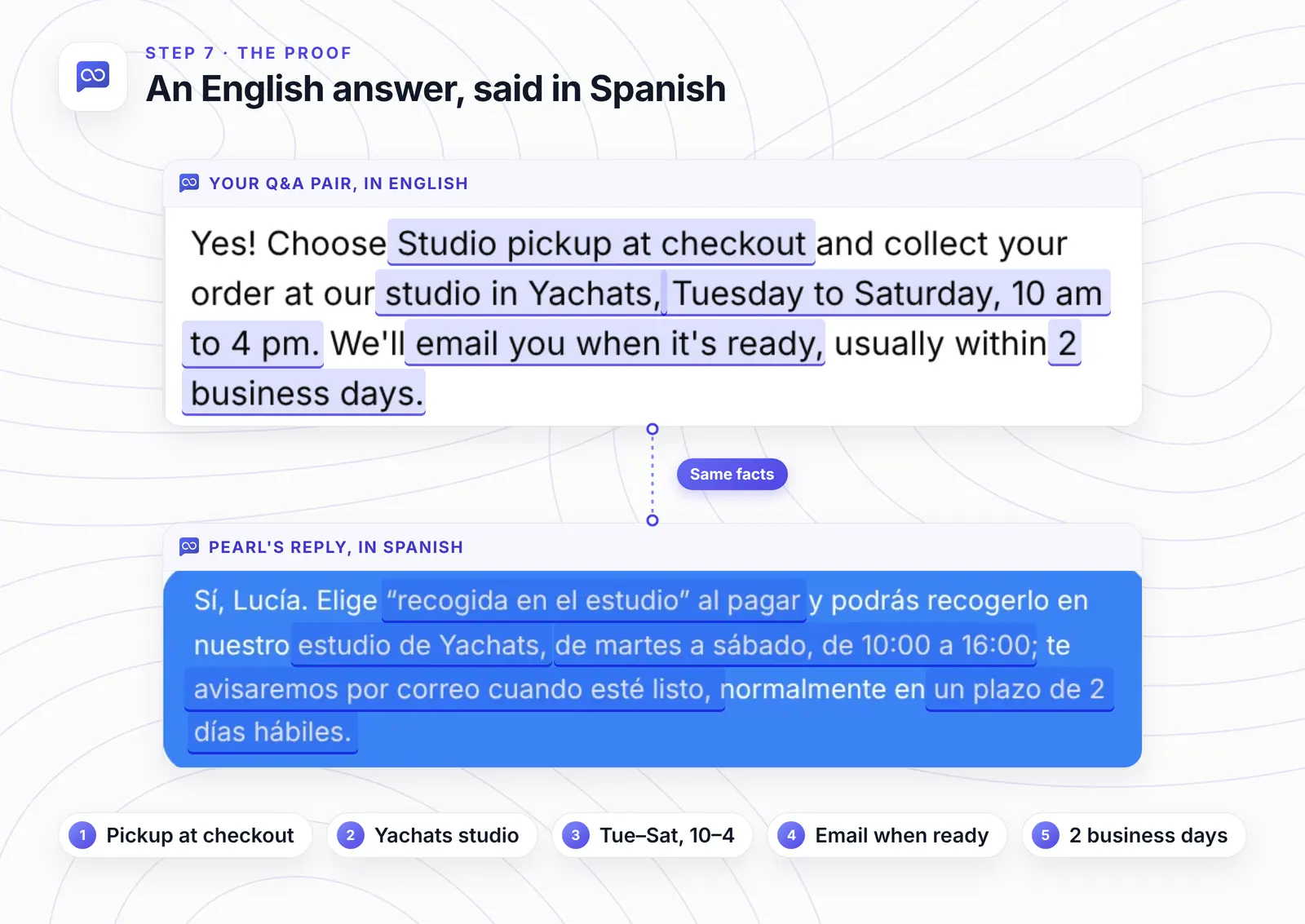
The Spanish reply came from an English Q&A pair, the one written for our guide to fixing a wrong answer. All five facts in the pair made it into the Spanish reply.
Selling to shoppers who don't write English? |
If the language isn't right
A reply comes back in English. It happened once in three of our tests, right after an English pre-chat form. Translate the form (Step 5).
A reply says it doesn't know. Ask a specific question; a vague one got a non-answer in our tests.
Half the widget is still in English. Those are your own texts. Retype them on the Basic and Behavior tabs and in the pre-chat form.
The new chat button is still English. Type a label in Start New Conversation.
Your test opens an old chat. Use a fresh browser or a new private window for each new shopper.
How we tested this
The site: Tidewell's live demo site, with every page in English. Pearl had learned those pages, plus one English Q&A pair about studio pickup.
The recording, mid-October 2026: a French shopper with the widget in English, then the widget, suggested questions and pre-chat form switched to Spanish and a Spanish shopper in a fresh browser. Both replies are copied exactly from the recording. Afterwards we restored Pearl's English widget and form.
The recheck, 24 October 2026: we opened the Language list without changing anything and counted 18 languages; Pearl was back on English.
Not tested: languages other than French and Spanish, right-to-left layouts such as Arabic, and shoppers who switch language halfway through a chat.
The figures: frames from the recording and one image from the Q&A guide, cropped, with pins, outlines and highlights added; nothing in the interface was edited.
Frequently asked questions
Do I need to turn on a setting for other languages?
No. With nothing changed, Pearl answered a French question in French and a Spanish question in Spanish. The Language setting only changes the widget's own words.
Do I need to translate my website or training sources?
No. Both replies came from English sources: the Shipping page for the French one and an English Q&A pair for the Spanish one.
Which languages can the widget itself use?
Eighteen: English, Spanish, French, German, Italian, Portuguese, Arabic, Finnish, Danish, Norwegian, Mongolian, Swedish, Dutch, Polish, Chinese, Japanese, Turkish and Korean.
Does it work in any language?
We tested French and Spanish; both were answered in the shopper's language from English sources. The widget's own words come in 18 languages.
Will my team see the chats in English?
No. The inbox shows each chat as the shopper wrote it, in their language.
Back at Tidewell, Camille gets her delivery times in French and Lucía her pickup hours in Spanish, from the same English sources. Give your shop an agent that answers in each shopper's language, and if you also ask for names first, here's how the pre-chat form works.
 | Written by AssistLoop Team We build AssistLoop, an AI support agent that answers customers from your own website and documents, and hands the chat to your team when a person should step in. ★★★★★ "It's very flexible and user-friendly, making it easy to set up in about ten minutes." Ryan N., Managing Owner, Working Nomads, on G2 |
Build Custom AI Chatbot for Your Business FREE
Create intelligent AI agents that handle customer support, boost conversions, and work 24/7 for your business.
Build Your Agent