AI Agent vs Chatbot: What's the Difference?
A chatbot answers questions. An AI agent answers and acts: it checks your systems, does the task and hands the chat to a person when needed. Here is how to tell them apart and which one your support needs.
 Yared11 min read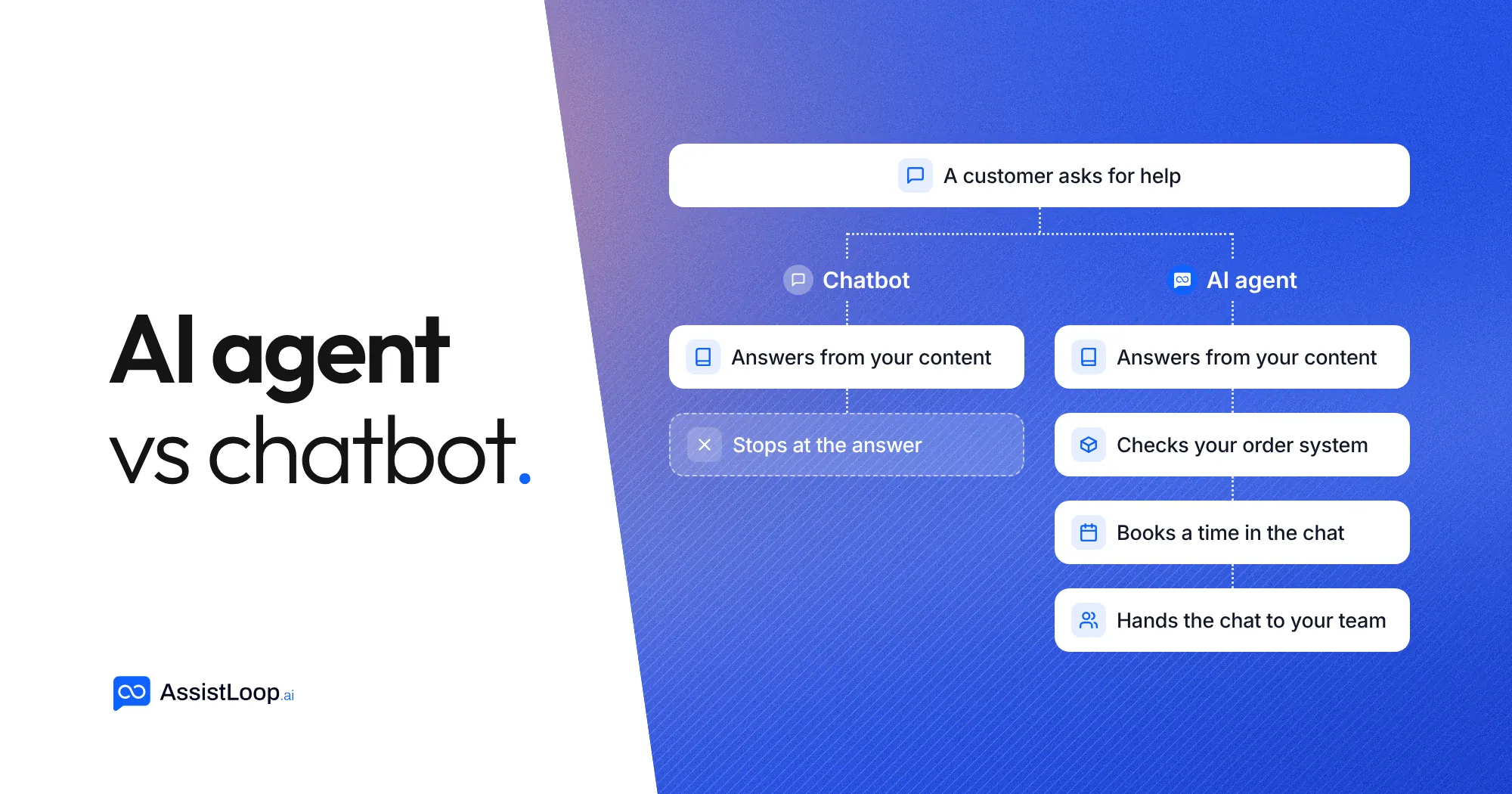
On this page
Updated 1 November 2026.
A chatbot answers questions. An AI agent answers questions and acts on them: it looks things up in your systems, does the task the customer asked for and passes the chat to a person when it should.
Both can sit in the same chat window, so they look alike. The difference shows the moment a customer asks for something that isn't written down anywhere, like "Where is my order?" or "Can I move my booking to Friday?". Below is how each one handles that, how to test a tool that calls itself an agent, and how to decide which one your support needs.
AI agent vs chatbot at a glance
| Chatbot | AI agent | |
|---|---|---|
| What it does | Replies to a message | Works towards the customer's goal, one step after another |
| Where answers come from | A script, or your help content | Your help content plus live data from your systems |
| Can it take actions? | No, or only fixed buttons and links | Yes: it calls tools such as your order system, calendar or ticketing |
| Who decides the next step | The script, or a single reply each turn | The model, within the tools and rules you give it |
| When it can't help | Repeats a fallback message or sends a link | Says so, then opens a ticket or hands the chat to your team |
| Typical setup | A flow builder, or a list of pages to learn from | Your content, plus the tools and limits you allow |
| Best for | Answering the same questions from your FAQ | Questions that need a lookup, a change or a person |
What is a chatbot?
A chatbot is software that replies to messages in a chat. There are two kinds you will meet today.
Scripted chatbots follow a decision tree. The customer taps a button or types a keyword, and the bot sends the reply written for that branch. They are predictable, and they break as soon as someone asks in their own words.
AI chatbots use a large language model to understand the question and write the reply, usually from your own content: help pages, policies, product pages and PDFs. They handle questions phrased any way, in many languages. They still only answer. If the answer isn't in the content they were given, the best they can do is say they don't know or point to a page.
For a lot of support, answering is most of the job. Opening hours, delivery times, return rules and "does it work with X?" all have an answer that already exists somewhere on your site.
What is an AI agent?
An AI agent is a model that can use tools to get something done, and decides for itself which tool to use and when. Anthropic, the company behind Claude, puts it this way in its guide to building agents: agents are systems where "LLMs dynamically direct their own processes and tool usage, maintaining control over how they accomplish tasks". A workflow, by contrast, runs tools "through predefined code paths".
In customer support, the tools are the systems your team already opens to help a customer:
- your order or booking system, to check a status or change something
- your calendar, to book a slot
- your ticketing or CRM, to log work that needs a person later
- your team, through a handover that keeps the conversation history
Anthropic's guide uses customer support as one of its two examples of where agents work well. Its reasoning: a support chat looks like any chatbot conversation, but it needs customer data, order history and help articles, and actions such as refunds or ticket updates can be carried out by the system through tools.
So an AI agent is not a different kind of chat window. It is a chatbot that has been given tools, the judgement to pick one, and rules for when to stop and hand over.
One question, two answers
Say Wickford Candle Co., a small online shop, gets this message at 11 pm:
"Hi, I ordered on Monday, order 48213. Has it shipped yet?"
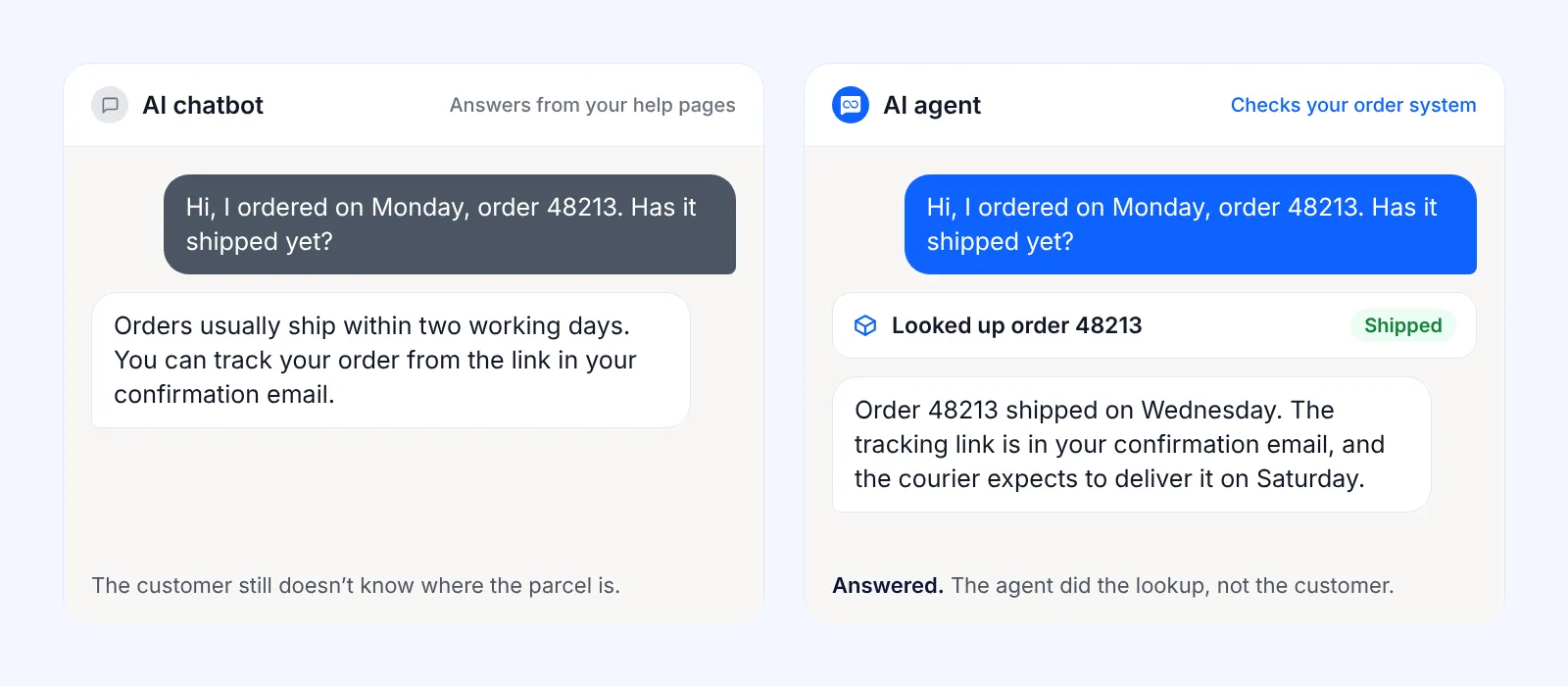
An AI chatbot trained on the shop's help pages replies with what the pages say: "Orders usually ship within two working days. You can track your order from the link in your confirmation email." That's accurate, and the customer still doesn't know where their parcel is.
An AI agent with access to the order system does three things. It reads the order number from the message, looks the order up and replies: "Order 48213 shipped on Wednesday. The tracking link is in your confirmation email, and the courier expects to deliver it on Saturday." If the lookup shows a problem, such as an address the courier couldn't find, it tells the customer a person will follow up and passes the chat, with the history, to the team.
Same question, same chat window. The first one hands the work back to the customer. The second one does it.
Why the two words get mixed up
"AI agent" became the label every vendor wants. In June 2025, Gartner warned about "agent washing": vendors rebranding chatbots, AI assistants and automation tools as agents without the autonomy that real agents need. It estimated that only about 130 of the thousands of vendors using the label offer genuine agent capabilities, and predicted that over 40% of agentic AI projects will be cancelled by the end of 2027, because of cost, unclear value or weak risk controls.
The same firm expects agents to matter a great deal in support. In March 2025, Gartner predicted that by 2029 agentic AI will resolve 80% of common customer service issues without a person stepping in.
Both forecasts point the same way. Agents are useful when they are connected to real systems with clear limits, and a chatbot with a new name doesn't get you there.
Which one do you need?
Start from the questions your customers actually send. Open your last 50 to 100 chats or emails and sort them:
- Questions answered by something you've already written (shipping times, prices, how-tos). An AI chatbot that answers from your content handles these.
- Questions that need a lookup or a change in one of your systems (order status, booking changes, account details). These need an AI agent with a tool connected to that system.
- Questions that need a person (refunds outside policy, complaints, anything sensitive). Either one should hand these over quickly, with the conversation attached, so the customer doesn't have to repeat themselves (how a good handoff works).
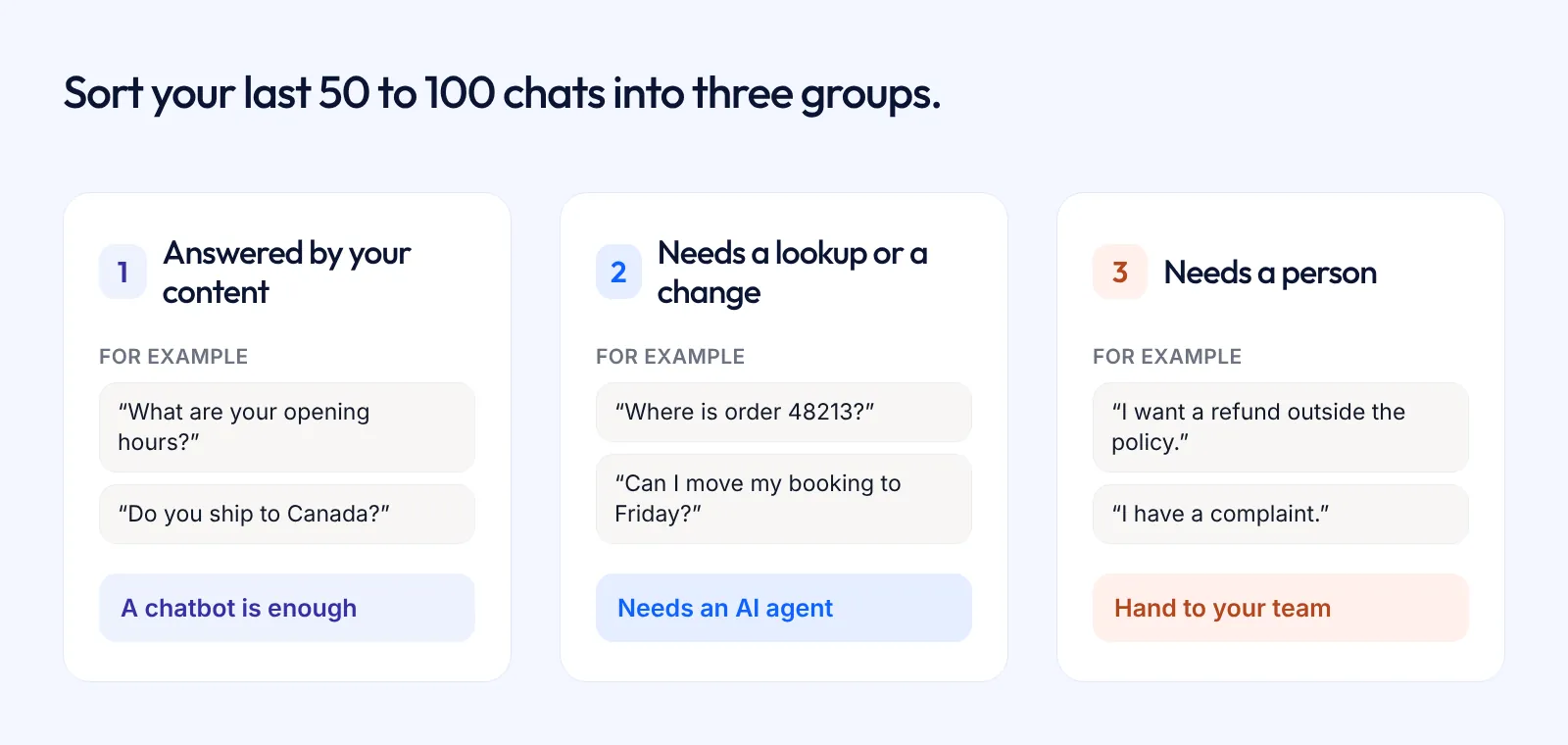
If almost everything lands in group 1, a chatbot is enough, and it's cheaper and simpler to run. Anthropic's own advice to developers is to "find the simplest solution possible" and add complexity only when it's needed. If group 2 is a real share of your volume, an agent saves your team the lookups that eat their day.
Two checks apply to both. The tool should answer only from your content and say when it doesn't know, rather than guess. And there should be a clear way for your team to take over any chat.
Five questions to ask a vendor that says "AI agent"
- Which of my systems can it connect to, and what can it do there: read, change, or both?
- Can I limit what it is allowed to do, and when it should use each action?
- What happens when it doesn't know the answer?
- How does a chat reach my team, and does the conversation history come with it?
- Can I see every action it took in a conversation?
If the honest answer to the first question is "it answers from your website", you're looking at a chatbot. That may be all you need, but the price should match.
Where AssistLoop fits
AssistLoop is an AI agent for customer support. It answers from your own content (website pages, files, text and Q&A pairs) and says so when it doesn't know. One agent works across your website, WhatsApp, Instagram, Messenger and Telegram, with every conversation in one inbox.
What makes it an agent rather than a chatbot is what it can do beyond answering:
- Agent Actions call your own API during the conversation. You describe when to use the action and which details it needs. The agent asks the customer for them, calls your endpoint and uses the response in its reply. Checking an order's status is a typical example (how to set it up).
- With Calendly or Cal.com connected, the customer picks a time and books without leaving the chat.
- The agent can open a ticket itself when a customer needs follow-up, in AssistLoop or in HubSpot.
- When a customer asks for a person, it hands the chat to your team with the full history, and a teammate takes over from the inbox or the mobile app.
There's no flow builder to design. You add your content, then switch on the actions you want.
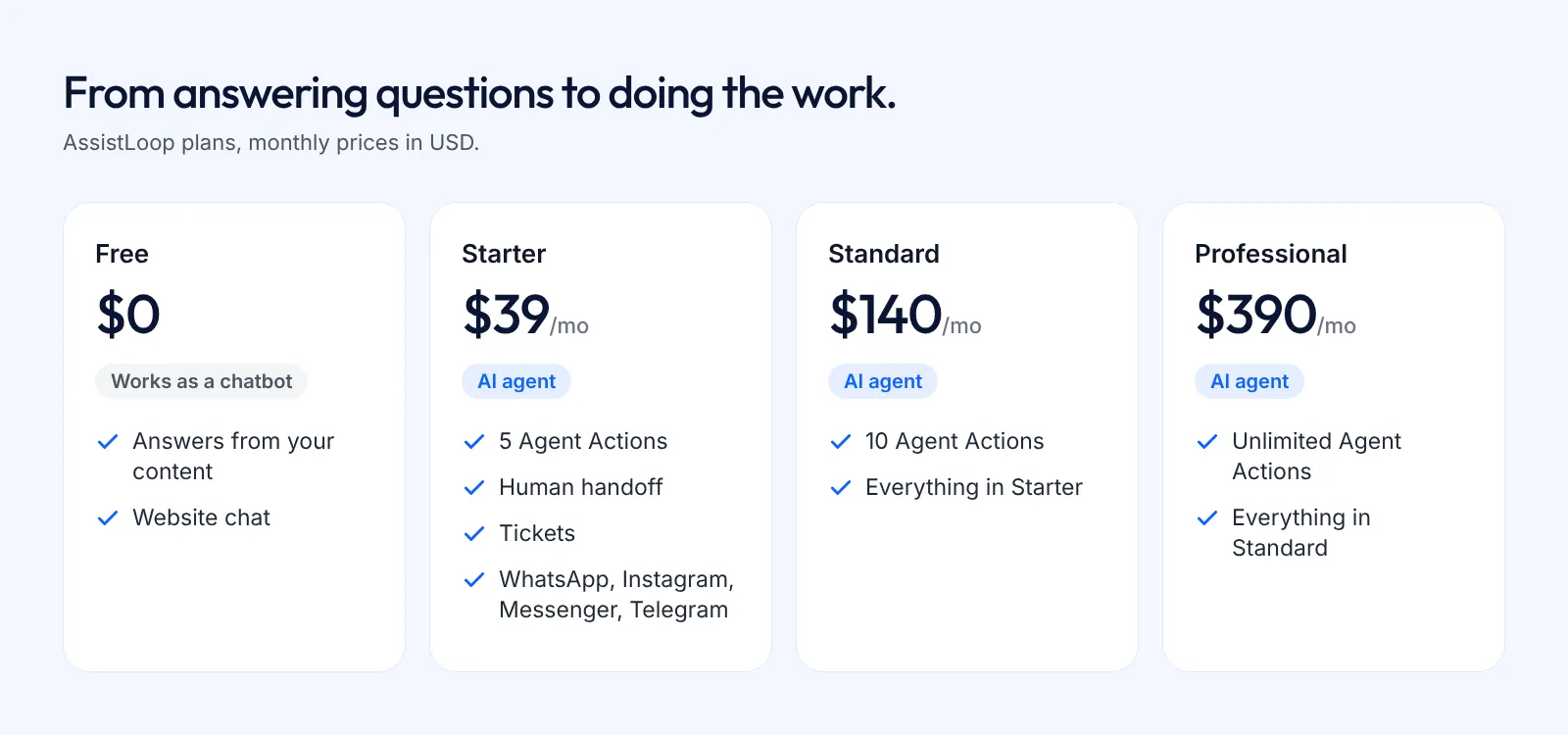
Plans decide how much of that you get. The Free plan answers from your content on your website, so it works as an AI chatbot. Paid plans add handoff, tickets and integrations, and Agent Actions: 5 on Starter ($39/month), 10 on Standard and unlimited on Professional (pricing). If your questions are mostly group 1, the Free plan may be all you need. Start there, read the chats, and add actions when you see the lookups piling up.
FAQ
Is an AI agent the same as a chatbot?
No. Every AI agent in support has a chat interface, so it can do what a chatbot does. A chatbot can't do what an agent does: use tools to look things up or change things in your systems, and decide when to use them.
What's the difference between an AI agent, a chatbot and an AI assistant?
A chatbot replies to customers. An AI assistant helps the person using it, for example by drafting an email or summarising a document, usually step by step at that person's request. An AI agent works towards a goal on its own, using tools, within limits you set. The words overlap in marketing, so judge a product by what it can actually do.
Is ChatGPT a chatbot or an AI agent?
Both, depending on the mode. Ordinary ChatGPT chats work as an AI chatbot. In July 2025 OpenAI added ChatGPT agent, which uses its own virtual computer and tools to carry out multi-step tasks for you. Neither is set up to answer your customers from your content out of the box. That's what support tools are for.
What's the difference between a WhatsApp chatbot and a WhatsApp AI agent?
The same as on a website. A WhatsApp chatbot replies with set answers or answers from your content. A WhatsApp AI agent can also check an order, book a time or hand the chat to your team inside WhatsApp. In AssistLoop, the same agent answers on WhatsApp and your website, with the chats in one inbox.
Will an AI agent replace my support team?
It takes the repeat questions and the routine lookups off your team, so people spend their time on the chats that need them. You still need a person for exceptions, complaints and anything the agent isn't allowed to do. A good agent hands those over quickly.
Is an AI agent more expensive than a chatbot?
Often, because actions and integrations sit on higher plans. Agents also cost more per answer when they take several steps. With AssistLoop, AI replies use message credits at a rate set by the model you choose, and Agent Actions start on the Starter plan at $39 a month.
Try it on your own questions
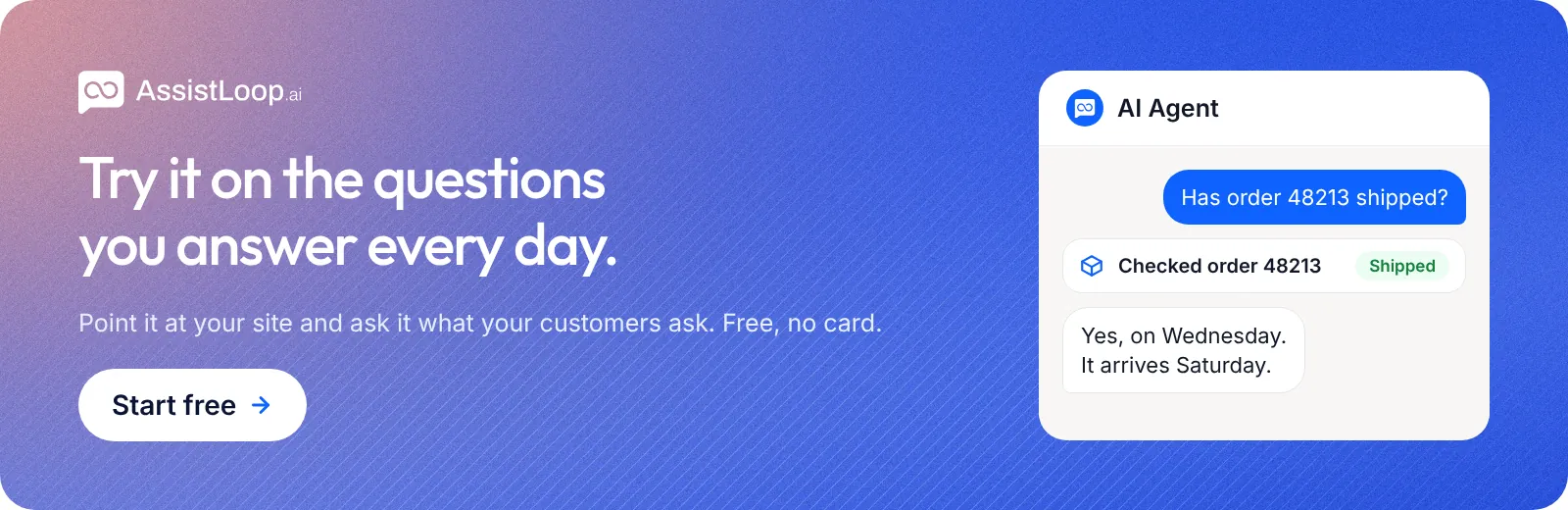
The fastest way to see the difference is to put your own content behind a chat and send it the questions you get every day. Start free, no credit card, and read what it answers before you decide whether you need actions.
Sources
- Anthropic, Building effective agents, 19 December 2024.
- Gartner, Gartner Predicts Agentic AI Will Autonomously Resolve 80% of Common Customer Service Issues Without Human Intervention by 2029, 5 March 2025.
- Gartner, Gartner Predicts Over 40% of Agentic AI Projects Will Be Canceled by End of 2027, 25 June 2025.
- OpenAI, Introducing ChatGPT agent, 17 July 2025.
- AssistLoop product details: Agent Actions, Human handoff, Pricing, checked 1 November 2026.
Build Custom AI Chatbot for Your Business FREE
Create intelligent AI agents that handle customer support, boost conversions, and work 24/7 for your business.
Build Your Agent